OB1 app "Bug" reports ONLY

@Michael
Android 12.1
Pixel 6 Pro
App v11.10.1

On the Plan tab of Maps, tapping on a Resource icon (Camp Site, Offroad Trail, WiFi, etc.) isn't popping up any information about the location (title, notes, coordinates, etc.)

I've tried clearing storage/cache, reinstalling, etc.

Also occasionally have problems with the map snapping back to my current location while panning and zooming around the map. Haven't pinned down to to exactly to reproduce the issue.

Thanks!
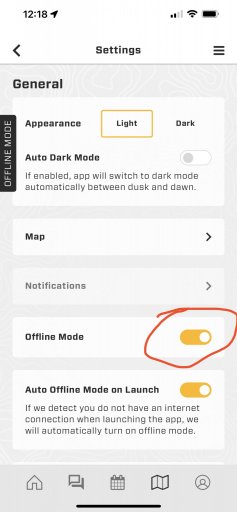
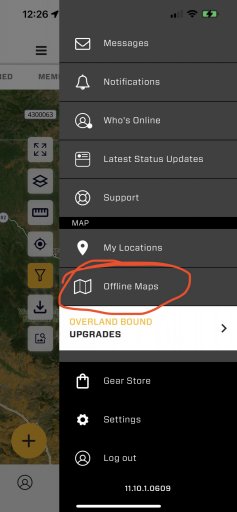
You’re in offline mode, go to settings and turn offline mode to automatic.
1F95A0DC-37AB-44C7-9224-734CA56F7808.jpeg

the second issue of your map recentering to your current location is you have the bullseye pressed to center on your location.
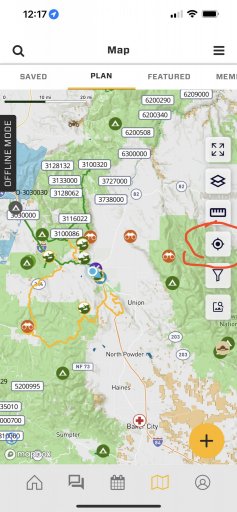
F148E980-D84C-48E5-B593-ACFF6F698ADE.jpeg
 
@M Rose thanks for the response!

You’re in offline mode, go to settings and turn offline mode to automatic.

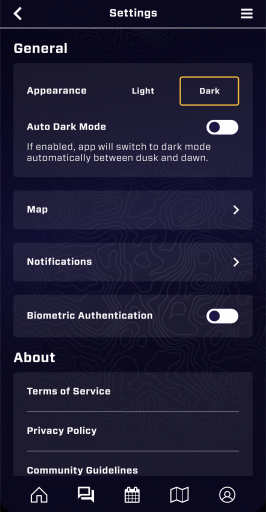
Offline mode doesn't seem to exist in my Settings screen??

Screenshot_20220615-124449.png

the second issue of your map recentering to your current location is you have the bullseye pressed to center on your location.

Unfortunately that isn't what is happening for me, I can very intentionally only interact with the bottom left section of the phone screen and it will still snap back to my location on occasion :worried:
 
Hi Michael,

Following your post with the new "Get Location From Photo" button I also tried this function again while adding a POI. I think this function is really a great idea and makes it so much easier. But unfortunately, the app still crahes then when I use it.

OB 1 App version 11.10.1.0609
Android 11
Samsung Xcover 4s device

If you need more info or I can help to reconstruct the error just let me know please. Always happy to help.

Bjoern
Got this Bjoern, thank you! I'll report this as is and see if we can track down the issue.

M
 
  • Like
Reactions: El-Dracho
Thank you
@Michael
Android 12.1
Pixel 6 Pro
App v11.10.1

On the Plan tab of Maps, tapping on a Resource icon (Camp Site, Offroad Trail, WiFi, etc.) isn't popping up any information about the location (title, notes, coordinates, etc.)

I've tried clearing storage/cache, reinstalling, etc.

Also occasionally have problems with the map snapping back to my current location while panning and zooming around the map. Haven't pinned down to to exactly to reproduce the issue.

Thanks!

Thank you! This has been captured. High priority in current sprint. We'll reach out here if we need further information.

M
 
Thank you
@Michael
Android 12.1
Pixel 6 Pro
App v11.10.1

On the Plan tab of Maps, tapping on a Resource icon (Camp Site, Offroad Trail, WiFi, etc.) isn't popping up any information about the location (title, notes, coordinates, etc.)

I've tried clearing storage/cache, reinstalling, etc.

Also occasionally have problems with the map snapping back to my current location while panning and zooming around the map. Haven't pinned down to to exactly to reproduce the issue.

Thanks!

Thank you! This has been captured. High priority in current sprint. We'll reach out here if we need further information.

M

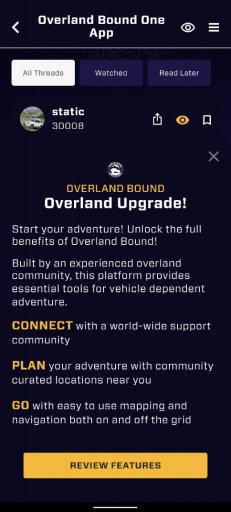
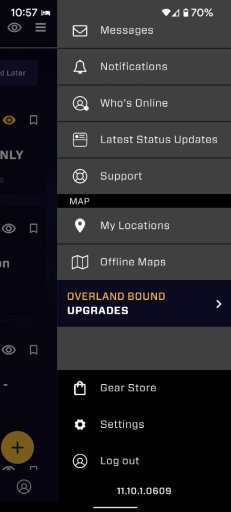
I am also having this issue. I cannot select any pins. I also don't have an offline maps selector in settings. I do have an offline maps tab, but when I click it the app takes me to a subscription notification, though I'm subscribed.
 

Attachments

  • media.jpg
    media.jpg
    186.8 KB · Views: 0
  • media.jpg
    media.jpg
    99.9 KB · Views: 1
  • Like
Reactions: Michael
Thank you
@Michael
Android 12.1
Pixel 6 Pro
App v11.10.1

On the Plan tab of Maps, tapping on a Resource icon (Camp Site, Offroad Trail, WiFi, etc.) isn't popping up any information about the location (title, notes, coordinates, etc.)

I've tried clearing storage/cache, reinstalling, etc.

Also occasionally have problems with the map snapping back to my current location while panning and zooming around the map. Haven't pinned down to to exactly to reproduce the issue.

Thanks!

Thank you! This has been captured. High priority in current sprint. We'll reach out here if we need further information.

M

I am also having this issue. I cannot select any pins. I also don't have an offline maps selector in settings. I do have an offline maps tab, but when I click it the app takes me to a subscription notification, though I'm subscribed.

We have a build submitted to fix this. You have Android correct? Watch for a new build within hours.
 
  • Like
Reactions: El-Dracho
Thank you
@Michael
Android 12.1
Pixel 6 Pro
App v11.10.1

On the Plan tab of Maps, tapping on a Resource icon (Camp Site, Offroad Trail, WiFi, etc.) isn't popping up any information about the location (title, notes, coordinates, etc.)

I've tried clearing storage/cache, reinstalling, etc.

Also occasionally have problems with the map snapping back to my current location while panning and zooming around the map. Haven't pinned down to to exactly to reproduce the issue.

Thanks!

Thank you! This has been captured. High priority in current sprint. We'll reach out here if we need further information.

M

I am also having this issue. I cannot select any pins. I also don't have an offline maps selector in settings. I do have an offline maps tab, but when I click it the app takes me to a subscription notification, though I'm subscribed.

We have a build submitted to fix this. You have Android correct? Watch for a new build within hours.

Wow, that was fast! Yes, Google Pixel 6.
 
  • Like
Reactions: Michael
Thank you
@Michael
Android 12.1
Pixel 6 Pro
App v11.10.1

On the Plan tab of Maps, tapping on a Resource icon (Camp Site, Offroad Trail, WiFi, etc.) isn't popping up any information about the location (title, notes, coordinates, etc.)

I've tried clearing storage/cache, reinstalling, etc.

Also occasionally have problems with the map snapping back to my current location while panning and zooming around the map. Haven't pinned down to to exactly to reproduce the issue.

Thanks!

Thank you! This has been captured. High priority in current sprint. We'll reach out here if we need further information.

M

I am also having this issue. I cannot select any pins. I also don't have an offline maps selector in settings. I do have an offline maps tab, but when I click it the app takes me to a subscription notification, though I'm subscribed.

We have a build submitted to fix this. You have Android correct? Watch for a new build within hours.

Wow, that was fast! Yes, Google Pixel 6.

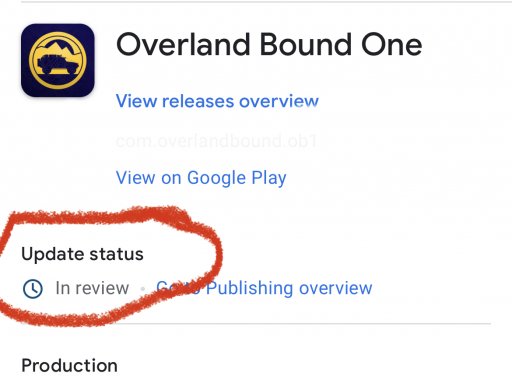
Ya, still in review right now. Might be tomorrow morning.
 

Attachments

  • media.jpg
    media.jpg
    325.2 KB · Views: 2
I am also having this issue. I cannot select any pins. I also don't have an offline maps selector in settings. I do have an offline maps tab, but when I click it the app takes me to a subscription notification, though I'm subscribed.
You have two separate issues… one @Michael is fixing with the pin selection, the other issue for offline maps has to do with your subscription service. You have the “Adventure Tier” which allows you to view while online, but does not have off line maps and off line navigation. In order to have offline maps in the app you have to be part of the expedition tier. Which yes is an upgrade to your current subscription.

4738D1CA-5609-4DFB-B791-605A422B116A.jpeg
 
I am also having this issue. I cannot select any pins. I also don't have an offline maps selector in settings. I do have an offline maps tab, but when I click it the app takes me to a subscription notification, though I'm subscribed.
You have two separate issues… one @Michael is fixing with the pin selection, the other issue for offline maps has to do with your subscription service. You have the “Adventure Tier” which allows you to view while online, but does not have off line maps and off line navigation. In order to have offline maps in the app you have to be part of the expedition tier. Which yes is an upgrade to your current subscription.

View attachment 234031

Thank you for the clarification, that makes sense.
 
  • Like
Reactions: Michael
Just updated the new version for android. The icons can be tapped again. Great. Thanks for the quick response and the bugfix, great job!
 
  • Love
Reactions: Michael
Ok... this just started on my android phone.

When I click on the Overland Bound One app, it pulls up (Jeep in the dark blue background), the little wheel starts spinning for a second or two, then it stops (Overland Bound One screen disappears), and I get the message "Overland Bound One has stopped". And I'm given two options: Restart app or Send feedback. When I click on "Restart app", it repeats itself.

I uninstalled and reinstalled the app (now on version 11.12.1). Still doing it.

Shut down my phone and restarted it. No change.

Any suggestions?
 
Ok... this just started on my android phone.

When I click on the Overland Bound One app, it pulls up (Jeep in the dark blue background), the little wheel starts spinning for a second or two, then it stops (Overland Bound One screen disappears), and I get the message "Overland Bound One has stopped". And I'm given two options: Restart app or Send feedback. When I click on "Restart app", it repeats itself.

I uninstalled and reinstalled the app (now on version 11.12.1). Still doing it.

Shut down my phone and restarted it. No change.

Any suggestions?

Mine did this to me earlier today…but now works.. idk