Ask About Gaia GPS!

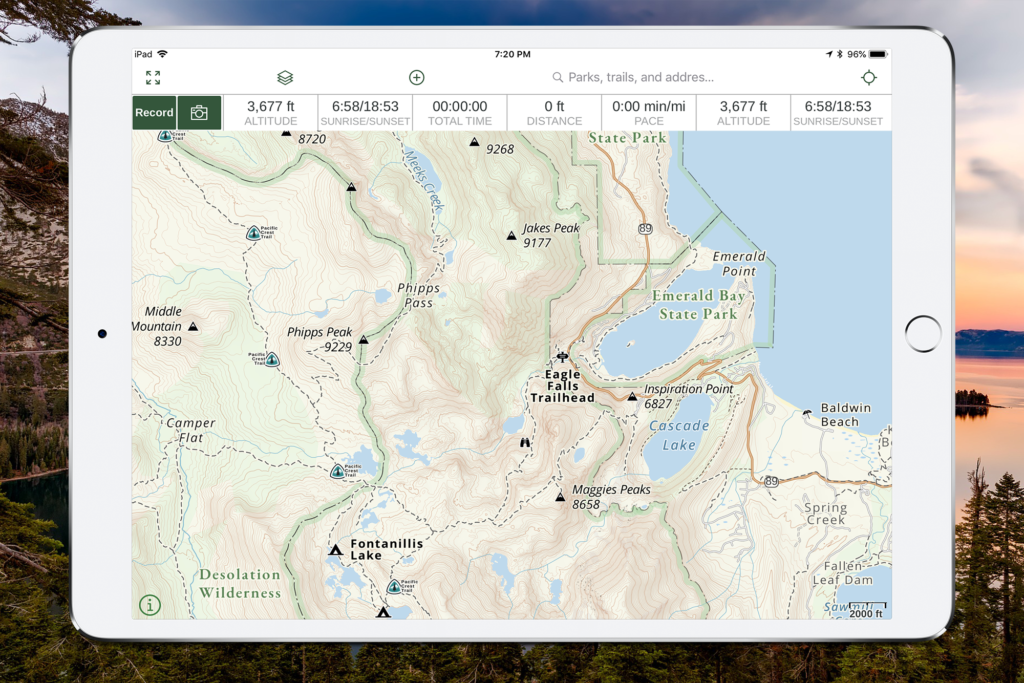
This may come across as a silly question, however if I purchase a Premium Membership, it will work across both Android and Apple platforms correct? I prefer Samsung phones but we have a little used iPad in our home that I plan to commandeer for trail use. LOL
Yes it will. I use an android to track trips while my wife makes sure I'm going where we planned [emoji41]
 
What size memory card are you guys using for downloaded maps? I exceeded my 32g factory memory rather quickly since the os takes so much to run.
 
I was going to try Gaia out on an older iPad just to see how different the experience is compared to Android but it appears you have to run iOS 10.0 or above. Bummer!
 
Hey everyone. Complete newb here, as it is my first day on this forum. I'd consider myself a tech geek, and reading through a couple of threads I keep seeing people trying to find the best compromise between handheld gps, tablets with Gaia, etc.

Forgive me if I've missed it, but I wanted to confirm that I own a Garmin Overlander and it can run Gaia too. I'm not sure that many folks realized this, but in addition to the built in apps, I really think it can serve as a true one size solution for most people, albeit expensive. Now if only In Reach was built in...

I think I'll mention this in the Overlander thread as well for folks that may be on the fence on their next setup.
 
  • Like
Reactions: dstock
Hey everyone. Complete newb here, as it is my first day on this forum. I'd consider myself a tech geek, and reading through a couple of threads I keep seeing people trying to find the best compromise between handheld gps, tablets with Gaia, etc.

Forgive me if I've missed it, but I wanted to confirm that I own a Garmin Overlander and it can run Gaia too. I'm not sure that many folks realized this, but in addition to the built in apps, I really think it can serve as a true one size solution for most people, albeit expensive. Now if only In Reach was built in...

I think I'll mention this in the Overlander thread as well for folks that may be on the fence on their next setup.

Good to know. I still prefer the iOS version to Android but everyone is different. When I watched one of the XOverland videos I personally found it comical to see them to attempt to plan/review anything on the small screen. Maybe there is a computer based component.

I love Gaia on a larger tablet. When I travel with groups it’s easy to share the map on a larger screen.

Only thing a stand alone GPS IMHO is offline road maps. I use MapsMe but it tends to not keep maps current when I need them. Otherwise it is ok as a quick gut check on mileage and pavement route.
 
  • Like
Reactions: Snic8156
Hey everyone. Complete newb here, as it is my first day on this forum. I'd consider myself a tech geek, and reading through a couple of threads I keep seeing people trying to find the best compromise between handheld gps, tablets with Gaia, etc.

Forgive me if I've missed it, but I wanted to confirm that I own a Garmin Overlander and it can run Gaia too. I'm not sure that many folks realized this, but in addition to the built in apps, I really think it can serve as a true one size solution for most people, albeit expensive. Now if only In Reach was built in...

I think I'll mention this in the Overlander thread as well for folks that may be on the fence on their next setup.
Can a Garmin Overlander be connected to a Ham to report ARPS so you can see other overlanders in your group on the screen? I ask because this can be done with IOS running GAIA and a gps enabled Ham Radio like the Yaesu FTM-400XDR or so I have been told.
 
Can a Garmin Overlander be connected to a Ham to report ARPS so you can see other overlanders in your group on the screen? I ask because this can be done with IOS running GAIA and a gps enabled Ham Radio like the Yaesu FTM-400XDR or so I have been told.
I don't know how Android functionality differs from iOS and my ham is not GPS enabled. I have been successful in connecting other items to the Overlander such as my obd ii scanner over Bluetooth using jscan. If your ham connects via Bluetooth, you may be in luck.
 
Good to know. I still prefer the iOS version to Android but everyone is different. When I watched one of the XOverland videos I personally found it comical to see them to attempt to plan/review anything on the small screen. Maybe there is a computer based component.

I love Gaia on a larger tablet. When I travel with groups it’s easy to share the map on a larger screen.

Only thing a stand alone GPS IMHO is offline road maps. I use MapsMe but it tends to not keep maps current when I need them. Otherwise it is ok as a quick gut check on mileage and pavement route.

I would assume the Garmin Basecamp software works with the Overlander the same as with other Garmin nav units and you can do all your pre-planning on the computer and then download it to the Overlander.
 
  • Like
Reactions: 1Louder
Recent issue I’m having and hoping someone might know.

On my Mac I created a number of routes and they display on the main map. However, if I log onto the app on my iPad or my phone, these tracks do not display on the map even though the same tracks are in the saved folder and selected to be viewed on the map.

Any ideas?
 
  • Like
Reactions: Wawa Skittletits
Recent issue I’m having and hoping someone might know.

On my Mac I created a number of routes and they display on the main map. However, if I log onto the app on my iPad or my phone, these tracks do not display on the map even though the same tracks are in the saved folder and selected to be viewed on the map.

Any ideas?

I have seen some pinch and zoom issues. Where the tracks will disappear for some reason if the zoom level is closer. Not sure why. Try to zoom out and see if the track shows up again. I have to send a bug report to Gaia about this.
 
It’s my experience with Gaia GPS on my iPad or iPhone that if I haven’t opened it in a while, it takes a long time to update my downloaded base maps. If it is not syncing, it may be updating. Eventually it will work itself out. You just have to let it update.
You can check the last time it synced by clicking settings/account/last sync.
 
Recent issue I’m having and hoping someone might know.

On my Mac I created a number of routes and they display on the main map. However, if I log onto the app on my iPad or my phone, these tracks do not display on the map even though the same tracks are in the saved folder and selected to be viewed on the map.

Any ideas?

I‘m having the same issue and can’t make sense of it. Originally I thought it was just my oldest routes which were made before the app changed years ago but then I noticed some of my newest routes have disappeared as well. Oddly enough the waypoints are still visible.
 
if it says that you are up to date on your tablet (last sync), maybe start a help ticket with gaia.
 
Last edited:
  • Like
Reactions: M Rose
  • Like
Reactions: 1Louder
Received a potential solution for you @Booboodmb...

Apparently in a recent app update they separated routes and tracks in the map overlay. The solution is to tap the Layers icon, tap Map Overlay, and toggle on routes. I don't know why they did this change but once you do that a simple restart of the app will hopefully take care of your issue.
 
  • Like
Reactions: DevilDodge