

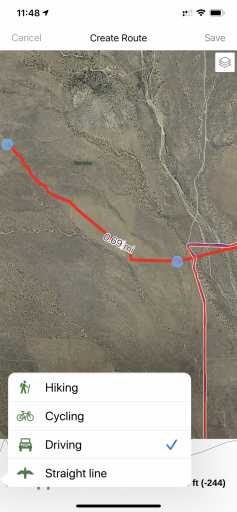
So I just purchase my premium membership and I try to make routes on my tabet but when I select guide me its a straight line and if I choose driving directions it puts me into google maps. what am I doing wrong? sorry newb at gaia gps
Ask About Gaia GPS!
- Thread starter 1Louder
- Start date
You are using an out of date browser. It may not display this or other websites correctly.
You should upgrade or use an alternative browser.
You should upgrade or use an alternative browser.


So I just purchase my premium membership and I try to make routes on my tabet but when I select guide me its a straight line and if I choose driving directions it puts me into google maps. what am I doing wrong? sorry newb at gaia gps
There are multiple routing options in the app. Bird/straightine, hike, bicycle and vehicle I believe. Gaia support site can provide better instructions. Sometimes you have to play with the different options to get Gaia to route the forest road or trail.
I think the routing data is based on OpenStreets data and not the layer you are using however I would again read up what the official Gaia GPS Support site says.
Last edited:

There are multiple routing options in the app. Bird/straightine, hike, bicycle and vehicle I believe. Gaia support site can provide better instructions. Sometimes you have to play with the different options to get Gaia to route the forest road or trail.
I think the routing data is based on OpenStreets data and not the layer you are using however I would again read up what the official Gaia GPS Support site says.
View attachment 133980
I understand that there are different modes but it still doesn't work how I need it, even after selecting the driving mode the gps still puts a straight line. I will keep trying


Member III
I sometimes have this problem when using GAIA on my computer. I typically have to move the waypoint closer to the previous waypoint for it to map the road.
I sometimes have this problem when using GAIA on my computer. I typically have to move the waypoint closer to the previous waypoint for it to map the road.
This is a valid point. It depends on the distance you are trying to automatically route. Start with smaller segments if a longer one can't be created.

Explorer I
- 3,038
- First Name
- Dave
- Last Name
- Stockslager
- Member #
2951
- Ham/GMRS Callsign
- KM6ZGS
I understand that there are different modes but it still doesn't work how I need it, even after selecting the driving mode the gps still puts a straight line. I will keep trying
same here

Member III
As a long time user of Gaia, I never use it for turn by turn navigation. That is what Google, Waze, Apple Maps are for, especially when there is cell service. I treat Gaia more like mapping software. It shows you were you are and you can easily zoom in/out and see where you are going. Setting routes, waypoints, tracks are all easy, but there are so many forest roads, etc, that I would never expect it to give good driving directions.
As a long time user of Gaia, I never use it for turn by turn navigation. That is what Google, Waze, Apple Maps are for, especially when there is cell service. I treat Gaia more like mapping software. It shows you were you are and you can easily zoom in/out and see where you are going. Setting routes, waypoints, tracks are all easy, but there are so many forest roads, etc, that I would never expect it to give good driving directions.
I was thinking it was a turn by turn since so many people used it. If its jut a map I have paper maps for that I don't think I needed gaia app then
Member III
I was hoping to be out places and find a new trail on the tablet and it can lead me there but a friend of mines says you have to get on a desktop computer and build your own route and then sync it to the tablet and its still not a turn by turn. I think I should have considered the garmin overland gps


Advocate III
- 5,584
- First Name
- Michael
- Last Name
- Rose
- Member #
20990
- Ham/GMRS Callsign
- W7FSB
- Service Branch
- US ARMY Retired
I haven’t used a desktop pc, or a laptop for that matter, for at least 3 years. I do everything from my iPad, iPhone, or my Samsung galaxy Tab. With that being said. I can build routs, make dedicated turn by turn maps, and so much more with GAIA. I made a backpacking trip in GAIA last summer and ran in next to my Garmin Device using my iPhone 6s without cell service. It worked better than the Garmin. I was able to log elevation drop, time traveled, time stopped, miles traveled, even feet traveled. At first I was kind of disappointed in the app as well coming from Backcountry Navigator Pro. But since I switched to mostly apple products I could no longer use BCNP. Now after almost a year of using GAIA, I don’t use anything but for all my nav needs.I was hoping to be out places and find a new trail on the tablet and it can lead me there but a friend of mines says you have to get on a desktop computer and build your own route and then sync it to the tablet and its still not a turn by turn. I think I should have considered the garmin overland gps
Member III
I haven’t used a desktop pc, or a laptop for that matter, for at least 3 years. I do everything from my iPad, iPhone, or my Samsung galaxy Tab. With that being said. I can build routs, make dedicated turn by turn maps, and so much more with GAIA. I made a backpacking trip in GAIA last summer and ran in next to my Garmin Device using my iPhone 6s without cell service. It worked better than the Garmin. I was able to log elevation drop, time traveled, time stopped, miles traveled, even feet traveled. At first I was kind of disappointed in the app as well coming from Backcountry Navigator Pro. But since I switched to mostly apple products I could no longer use BCNP. Now after almost a year of using GAIA, I don’t use anything but for all my nav needs.
^this^ I feel the same way. The learning curve can feel pretty steep, but once you are there, Gaia is really nice. For me, it really comes down to some pre-planning and getting the right maps/areas downloaded. After that it's great.
Explorer I
- 3,038
- First Name
- Dave
- Last Name
- Stockslager
- Member #
2951
- Ham/GMRS Callsign
- KM6ZGS
I was hoping to be out places and find a new trail on the tablet and it can lead me there but a friend of mines says you have to get on a desktop computer and build your own route and then sync it to the tablet and its still not a turn by turn. I think I should have considered the garmin overland gps
I actually went back to an older Garmin unit for this exact reason which came in handy when we were out over the holidays and realized we weren't going to make our planned destination and we were in an area with no cell service.
Gaia does many things well but it does require pre-planning in the sense that you need to make sure you have all the maps downloaded prior to your trip. I found creating a route that actually follows the trail painful on the tablet (Android) but not difficult on the computer and it will snap to the roads as opposed to giving you a straight line.
I don't have any experience with the Garmin Overlander but I could see where the incorporation of the iOverlander app combined with the auto-routing abilities of the Garmin would make it easier for on the fly routing changes. Granted, there's a cost involved for that convenience, but when isn't there? LOL
Advocate III
- 5,584
- First Name
- Michael
- Last Name
- Rose
- Member #
20990
- Ham/GMRS Callsign
- W7FSB
- Service Branch
- US ARMY Retired
If you are using an android device, check out Backcountry Navigator... it has a demo version, which is ok, but really opens up once you buy it. It might be more on line with what you are wanting to do, it still doesn’t give you turn by turn directions per say, but I’m very unsure of any device or app that has detailed FS Maps with contoures and such that also offer turn by turn navigation That exists at this time.So maybe this app really isn't for me, I was playing with the app before paying for the subscription and I was thinking that once I pay for the subscription that it would be what I needed.
Member III
So maybe this app really isn't for me, I was playing with the app before paying for the subscription and I was thinking that once I pay for the subscription that it would be what I needed.
You can request a refund from Gaia and I am sure you will receive one. They are very customer service oriented. Just be warned I don't think the $700 Garmin device gives turn by turn. I have no interest in it so I am no expert on the product but many initial reviews were not favorable.
As others have stated I don't need turn by turn on trails either. Having a track someone else has recorded is nice and make life the easiest but creating waypoints at key turns is just as easy.


Enthusiast III
I have a bit more of an understanding now myself after reading all of this. Not having a turn by turn capability though is one thing, however the issue I'm having is while I'm in the learning and testing phases at moment I can see my speed/distance are not being logged by the icon indicating where I'm at is. I have an ipad 4 mini with gps/wifi capability but no cell service and tried this on multiple maps I downloaded with the same result. Is there something I'm not highlighting or clicking before driving that I should? The time is being logged from the time I click record but that's about it.
Advocate III
- 5,584
- First Name
- Michael
- Last Name
- Rose
- Member #
20990
- Ham/GMRS Callsign
- W7FSB
- Service Branch
- US ARMY Retired
Are you using the free trial, or the paid version? This seams like you are running the trial version. Do you see your marker move as you are driving, or is it stuck somewhere on the map?I have a bit more of an understanding now myself after reading all of this. Not having a turn by turn capability though is one thing, however the issue I'm having is while I'm in the learning and testing phases at moment I can see my speed/distance are not being logged by the icon indicating where I'm at is. I have an ipad 4 mini with gps/wifi capability but no cell service and tried this on multiple maps I downloaded with the same result. Is there something I'm not highlighting or clicking before driving that I should? The time is being logged from the time I click record but that's about it.
I have a bit more of an understanding now myself after reading all of this. Not having a turn by turn capability though is one thing, however the issue I'm having is while I'm in the learning and testing phases at moment I can see my speed/distance are not being logged by the icon indicating where I'm at is. I have an ipad 4 mini with gps/wifi capability but no cell service and tried this on multiple maps I downloaded with the same result. Is there something I'm not highlighting or clicking before driving that I should? The time is being logged from the time I click record but that's about it.
If you don’t have a 3G/LTE iPad you don’t have a built in GPS. If you have a 3G/LTE iPad but have not paid to have mobile service you do have the GPS. There is no such thing as a WiFi/GPS iPad.
Does the marker move with you when driving or do you have to manually move the map? If you are manually moving the map you don’t have GPS or it is not working properly.Thus you wouldn’t get any speed or distance indications.
