Ask About Gaia GPS!

Are you using the free trial, or the paid version? This seams like you are running the trial version. Do you see your marker move as you are driving, or is it stuck somewhere on the map?

I have the paid version, I bought a one year subscription

If you don’t have a 3G/LTE iPad you don’t have a built in GPS. If you have a 3G/LTE iPad but have not paid to have mobile service you do have the GPS. There is no such thing as a WiFi/GPS iPad.

Does the marker move with you when driving or do you have to manually move the map? If you are manually moving the map you don’t have GPS or it is not working properly.Thus you wouldn’t get any speed or distance indications.

So when I’m driving I am moving, it picks me up on the map however it does not follow me on the map. I’m driving off and need to zero in on my own again. I’m using the iPad I was issued at work so no real loss there. It’s tied in with an iPhone XR I was issued that provides wifi provided a signal is available.
 
And, for clarification's sake, if you DO NOT have a 3g/LTE iPad, you can buy a Bluetooth GPS receiver for a lot cheaper than the cost of a new tablet with a cellular antenna.

I use and recommend a Garmin GLO II.

Not sure if it’s the same but it does have a location access I can toggle on/off. It did not label it as “gps” though.

I suppose I can go to Best Buy and look into the device that you have.
 
  • Like
Reactions: M Rose
Not sure if it’s the same but it does have a location access I can toggle on/off. It did not label it as “gps” though.

I suppose I can go to Best Buy and look into the device that you have.

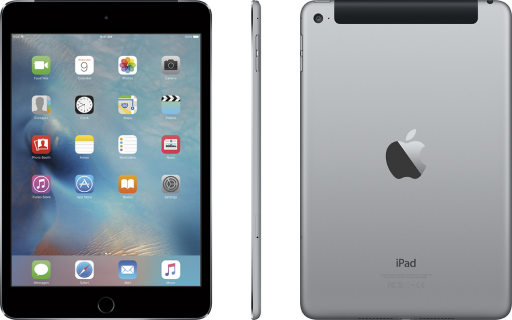
Does your iPad have a black plastic bar across the top, on the back? If yes, you have a cellular model with GPS antenna. If not, you don't.

1578986804258.png
 
Does your iPad have a black plastic bar across the top, on the back? If yes, you have a cellular model with GPS antenna. If not, you don't.

View attachment 135217

Just an FYI the iPad 11 Pro I own does not have said bar. There is the sim card port on the lower right.

Also for new folks always start with with 1st and 2nd post in this thread. A lot of the initial questions are addressed there. I edit it as required.

I don't think I have this tidbit but will add it.

If you have a wifi only iPad and are sitting with a wifi connection your iPad will likely target your location via wifi triangulation. You can see this is Apple maps, Google Maps, Gaia, etc. Hop in your vehicle and then see what happens. Tethering to your phones hotspot will not work. Pretty much any Bluetooth GPS receiver will work including the Garmin InReach. Dual GPS, Garmin Glo, and Bad Elf are popular options.

How can you tell? The easiest way is look for the sim card port on your iPad.

The next easiest may is go to Settings: About: look for Model Name (3 down from the top) Google your model name and you will find your answer. For example: mu162ll/a specs that is my iPad Pro Wifi/LTE model.
 
Last edited:
It sounds like you are just pinging off cellular/wifi, not getting actual GPS coordinates.
Yeah that was exactly what was happening. I would feel cheated if I paid for it but since it's my jobs iPad decided to go to AT&T today and get what will work for me. Samsung Tab A it is.. Thanks guys I'm sure I'll be back here soon as I continue learning more about this app
 
making the route which was giving me the hardest time and would only be in a straight line, I was messing with it on the tablet to create a route and not on a desktop
 
  • Like
Reactions: M Rose and 1Louder
And, for clarification's sake, if you DO NOT have a 3g/LTE iPad, you can buy a Bluetooth GPS receiver for a lot cheaper than the cost of a new tablet with a cellular antenna.

I use and recommend a Garmin GLO II.

Just got mine! Taking my first day trip this Saturday with it paired to my iPad Pro
 
  • Like
Reactions: Bama_Kiwi
This is a valid point. It depends on the distance you are trying to automatically route. Start with smaller segments if a longer one can't be created.
I’m a newbie to Gaia but I have found that smaller segments helps a ton with keeping it pretty painless to route.
 
  • Like
Reactions: tundra21
This may come across as a silly question, however if I purchase a Premium Membership, it will work across both Android and Apple platforms correct? I prefer Samsung phones but we have a little used iPad in our home that I plan to commandeer for trail use. LOL
 
  • Like
Reactions: HappyOurOverlanding