Resolved Sharing gpx from app

Also, there is Share, and Export. Different. Export is sending the actual gpx file. Sharing is sending a link to ob1 location. I Shared with you. That is this icon or “Share”.

I'm running Android version 10....

OB Route - 01-7-23 17.42.46 Gatton to Emu Creek
 
Also, there is Share, and Export. Different. Export is sending the actual gpx file. Sharing is sending a link to ob1 location. I Shared with you. That is this icon or “Share”.

I'm running Android version 10....

OB Route - 01-7-23 17.42.46 Gatton to Emu Creek

Did the correct thing for me. Opened the app. Hmm. @El-Dracho can you test? Anyone else with an Android?
 
  • Like
Reactions: El-Dracho
Also, there is Share, and Export. Different. Export is sending the actual gpx file. Sharing is sending a link to ob1 location. I Shared with you. That is this icon or “Share”.

I'm running Android version 10....

OB Route - 01-7-23 17.42.46 Gatton to Emu Creek

Did the correct thing for me. Opened the app. Hmm. @El-Dracho can you test? Anyone else with an Android?

Message sent but I'll repeat here

The link works when opened in the app.
The link doesn't work when sent externally. It opens the ob1 webpage. There is no prompt to open through the app.

How can I share the link directly from the share button to the app as you seem to be doing without any issue. Without copying and pasting a number of times in different applications.
 

Attachments

  • media.jpg
    media.jpg
    191.7 KB · Views: 1
  • Like
Reactions: El-Dracho
Also, there is Share, and Export. Different. Export is sending the actual gpx file. Sharing is sending a link to ob1 location. I Shared with you. That is this icon or “Share”.

I'm running Android version 10....

OB Route - 01-7-23 17.42.46 Gatton to Emu Creek

Did the correct thing for me. Opened the app. Hmm. @El-Dracho can you test? Anyone else with an Android?

This is what I get when I try to share. Not a direct share to the app. No option to share to the app.

 
This is what I get when I try to share. Not a direct share to the app. No option to share to the app.


So, you do not get a copy button to copy the link, right? That is strange.
 
  • Like
Reactions: Steve_ohhhhh
Did the correct thing for me. Opened the app. Hmm. @El-Dracho can you test? Anyone else with an Android?

Just tested that one. Does the correct thing for me. Tapping on the link posted above it opens the track in the OB1 App.
 
This is what I get when I try to share. Not a direct share to the app. No option to share to the app.


So, you do not get a copy button to copy the link, right? That is strange.

Very strange and a pain in the backside.
 
The link works when opened in the app.
The link doesn't work when sent externally. It opens the ob1 webpage. There is no prompt to open through the app.

So I just checked this one as well. So that we are quite sure that we are talking about the same thing, this I tested:
  • tapped your gpx track in the app
  • tapped the share button
  • tapped on share as email
  • sent myself this email
  • tapped the link in the generated email in the email client
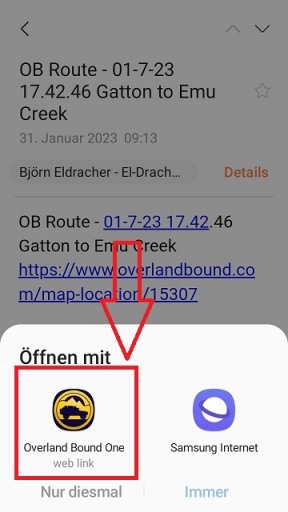
  • and then a prompt comes up how to open the link, internet and OB1 to choose from
  • if I tap OB1 it goes directly to the app to your track
 
The link works when opened in the app.
The link doesn't work when sent externally. It opens the ob1 webpage. There is no prompt to open through the app.

So I just checked this one as well. So that we are quite sure that we are talking about the same thing, this I tested:
  • tapped your gpx track in the app
  • tapped the share button
  • tapped on share as email
  • sent myself this email
  • tapped the link in the generated email in the email client
  • and then a prompt comes up how to open the link, internet and OB1 to choose from
  • if I tap OB1 it goes directly to the app to your track

This process worked for me also. However it is quite the long way round to just share it back in the app with copy paste from my email.
 
  • Like
Reactions: El-Dracho
Maybe it's because of the Android version? I'm on 11. Or it's the device and its software? I have a Samsung with the latest software version.

What device and software version are you working with @Steve_ohhhhh ?

As I said it worked that way. However why do I need to send myself the link? I want to send other members the link in the ob1 app?!
 
  • Like
Reactions: El-Dracho
This process worked for me also. However it is quite the long way round to just share it back in the app with copy paste from my email.

I think I have not understood it yet. What is quite a long way, please?

Sharing a gpx track: You just tap on share and then on the button how you want to share it, e.g. email and that's it.

Receiving a shared gpx track: If you get such a link by email, then you just tap on the link, tap on how you want to open it and that's it. You can even eliminate the latter step by telling the device once that it should ALWAYS open the link with OB1.

Or is that different on your device? Am I missing something?
 
This process worked for me also. However it is quite the long way round to just share it back in the app with copy paste from my email.

What is a long way?

Sharing a gpx track: You just tap on share and then on the button how you want to share it, e.g. email and that's it.

Getting a shared gpx track: If you get such a link by email, then you just tap on the link, tap on how you want to open it and that's it. You can even eliminate the latter step by telling the device once that it should ALWAYS open the link with OB1.

Or is that different on your device? Am I missing something?

I think we are getting lost in translation mate. Why can't I share the link in the app? That's what I'm trying to do. Yes I could send an email but to who? I don't have members email addresses. I have direct access to members in the app so why can't I just share a route or link directly to members directly in the app?
 
  • Like
Reactions: El-Dracho
As I said it worked that way. However why do I need to send myself the link? I want to send other members the link in the ob1 app?!

You can do that easily with the OB1 App:
  • tap the share button
  • copy the link and
  • paste it into a PN
OR do you think that after tapping the share button you would like to have OB 1 app in the selection (next to email, messenger services etc.)? And what should the app do then? Open a new PN? Open an input field where you can enter the forum name of the member? Or would you like to habe a possibility to tap a button within the App which just opens a prompt to enter a members forums name to sent the gpx track to that member?
 
I think we are getting lost in translation mate. Why can't I share the link in the app? That's what I'm trying to do. Yes I could send an email but to who? I don't have members email addresses. I have direct access to members in the app so why can't I just share a route or link directly to members directly in the app?

So, I think we have been talking about different points all along here.

1. On the one hand, you have a technical problem with the function of the shared link as you wrote further ahead:

"The link works when opened in the app.
The link doesn't work when sent externally. It opens the ob1 webpage. There is no prompt to open through the app."

This seems to me to be a problem with the device or the Android version. Because it works with other devices. Maybe someone could try with a Huawei on Android 10.

2. in addition, you have a suggestion for improving how a gpx track can be shared DIRECTLY in the OB1 app with other members.

Correct?
 
Maybe it's because of the Android version? I'm on 11. Or it's the device and its software? I have a Samsung with the latest software version.

What device and software version are you working with @Steve_ohhhhh ?

Huawei Mate 20 Pro Android 10. No more updates coming for this phone. As current as it's ever going to get.
 
I think we are getting lost in translation mate. Why can't I share the link in the app? That's what I'm trying to do. Yes I could send an email but to who? I don't have members email addresses. I have direct access to members in the app so why can't I just share a route or link directly to members directly in the app?

So, I think we have been talking about different points all along here.

1. On the one hand, you have a technical problem with the function of the shared link as you wrote further ahead:

"The link works when opened in the app.
The link doesn't work when sent externally. It opens the ob1 webpage. There is no prompt to open through the app."

This seems to me to be a problem with the device or the Android version. Because it works with other devices. Maybe someone could try with a Huawei on Android 10.

2. in addition, you have a suggestion for improving how a gpx track can be shared DIRECTLY in the OB1 app with other members.

Correct?

Correct.... I think.
 
  • Like
Reactions: El-Dracho
As I said it worked that way. However why do I need to send myself the link? I want to send other members the link in the ob1 app?!

You can do that easily with the OB1 App:
  • tap the share button
  • copy the link and
  • paste it into a PN
OR do you think that after tapping the share button you would like to have OB 1 app in the selection (next to email, messenger services etc.)? And what should the app do then? Open a new PN? Open an input field where you can enter the forum name of the member? Or would you like to habe a possibility to tap a button within the App which just opens a prompt to enter a members forums name to sent the gpx track to that member?

So yes. First part tap share button. Can't copy link. No option. That requires additional steps on mine. ie I can select email then when the email app opens I can select and copy link. Then I would be able to paste into a PN.

2nd part yes I believe the app should be offering options on how to share the link generated.
 
  • Like
Reactions: El-Dracho
So yes. First part tap share button. Can't copy link. No option. That requires additional steps on mine. ie I can select email then when the email app opens I can select and copy link. Then I would be able to paste into a PN.

2nd part yes I believe the app should be offering options on how to share the link generated.

Oha, now I got it. Sorry for the confusion, mate.
 
I hate to say it @Steve_ohhhhh but we may have reached end of service life on your phone. What i am saying is, i don't believe there is anything we can do on the app side. You don't see a copy button when you hit share button. The screen that comes up is purely OS, not OB1. At that point I think its out of our hands. Now, believe it or not, I've been wrong before. But it seems like the current Android Development Environment is not playing nicely with your OS version.

I would hate for you to spend money on a new phone and have it not work. You'd track me down. Do you have other map apps with a version in the last month where the share button works?