Resolved Sharing gpx from app

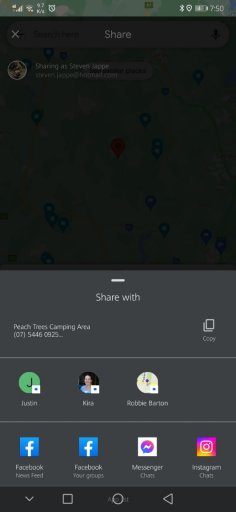
I hate to say it @Steve_ohhhhh but we may have reached end of service life on your phone. What i am saying is, i don't believe there is anything we can do on the app side. You don't see a copy button when you hit share button. The screen that comes up is purely OS, not OB1. At that point I think its out of our hands. Now, believe it or not, I've been wrong before. But it seems like the current Android Development Environment is not playing nicely with your OS version.

I would hate for you to spend money on a new phone and have it not work. You'd track me down. Do you have other map apps with a version in the last month where the share button works?

I can share and have the copy button in Google maps. And most other apps where sharing is an option. It's all good I'll figure out my own work around for this. Just takes extra steps.
I still think the app should give the option in app to share directly to members so I hope this suggestion can be taken onboard.
Thanks.
 

Attachments

  • media.jpg
    media.jpg
    129 KB · Views: 3
  • Like
Reactions: Aussie571
I can share and have the copy button in Google maps. And most other apps where sharing is an option. It's all good I'll figure out my own work around for this. Just takes extra steps.
I still think the app should give the option in app to share directly to members so I hope this suggestion can be taken onboard.
Thanks.
Yeah - see that's strange. I will definitely follow up with the developers here because if other apps are working, there has to be some app-side difference. Thanks Steve.
 
I hate to say it @Steve_ohhhhh but we may have reached end of service life on your phone. What i am saying is, i don't believe there is anything we can do on the app side. You don't see a copy button when you hit share button. The screen that comes up is purely OS, not OB1. At that point I think its out of our hands. Now, believe it or not, I've been wrong before. But it seems like the current Android Development Environment is not playing nicely with your OS version.

I would hate for you to spend money on a new phone and have it not work. You'd track me down. Do you have other map apps with a version in the last month where the share button works?

I can share and have the copy button in Google maps. And most other apps where sharing is an option. It's all good I'll figure out my own work around for this. Just takes extra steps.
I still think the app should give the option in app to share directly to members so I hope this suggestion can be taken onboard.
Thanks.

Can I get your build number? It’s in settings.
 
I hate to say it @Steve_ohhhhh but we may have reached end of service life on your phone. What i am saying is, i don't believe there is anything we can do on the app side. You don't see a copy button when you hit share button. The screen that comes up is purely OS, not OB1. At that point I think its out of our hands. Now, believe it or not, I've been wrong before. But it seems like the current Android Development Environment is not playing nicely with your OS version.

I would hate for you to spend money on a new phone and have it not work. You'd track me down. Do you have other map apps with a version in the last month where the share button works?

I can share and have the copy button in Google maps. And most other apps where sharing is an option. It's all good I'll figure out my own work around for this. Just takes extra steps.
I still think the app should give the option in app to share directly to members so I hope this suggestion can be taken onboard.
Thanks.

Can I get your build number? It’s in settings.

11.15.0.2022100186
 
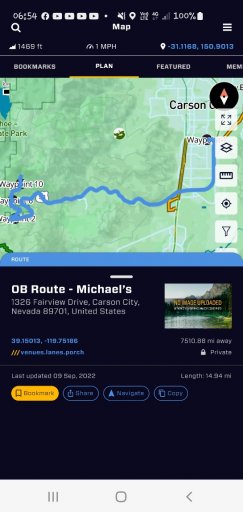
Hey @Steve_ohhhhh ! Let’s do a test. This link should open the app and my route:

OB Route - Michael’s

Hi guys hope you don't mind...but I have been following this tread..the link worked for me...but was unable to use the phones back arrow to leave the post...had to go to the 3 menu bars select notifications to get back out of it...it's like the phones back/return arrow has been disabled...same thing happens when trying to exit OB1 app!
 

Attachments

  • media.jpg
    media.jpg
    259.5 KB · Views: 0
  • Like
Reactions: Michael
Hey @Steve_ohhhhh ! Let’s do a test. This link should open the app and my route:

OB Route - Michael’s

Hi guys hope you don't mind...but I have been following this tread..the link worked for me...but was unable to use the phones back arrow to leave the post...had to go to the 3 menu bars select notifications to get back out of it...it's like the phones back/return arrow has been disabled...same thing happens when trying to exit OB1 app!

Correct! We found this issue and the latest build will resolve this. Thank you!
 
  • Like
Reactions: Aussie571
@Steve_ohhhhh try latest release? We did not do anything explicitly, but A LOT has been changed.

G'day @Michael
Still the same outcome. All good I'll make do with the options I have.
Update looks good. Still no main Metric option hey? I'll add a post on the appropriate thread.
Cheers
Steven.
 
  • Like
Reactions: Aussie571