Point of Interest Resources

Michael

Rank IX
Staff member
Founder 500
Member

Benefactor

15,584
Auburn, California, United States
First Name
Michael
Last Name
Murguia
Member #

0000

Ham/GMRS Callsign
KM6YSL
Points of interest are one of the main resources for planning Overland Travel. This tutorial will provide the information needed to get the most out of the Resources in Overland Bound One. Navigation, Information, Sharing, Suggesting Edits, Reviews, earning trophies, the works!

Points of Interest Resources Tutorial

 
Just watched this video - thank you! Learn something new with every video! One suggestion ;) It would be _really_ nice if your screen recordings highlighted the button/control that you are clicking on to get to the next screen that you are about to explain. As it is I often have a difficult time seeing just what you poked at to get to the new screen and have to rewind, watch again and possibly rinse and repeat. For instance "go into the actual details screen" @ ~6:53 in this latest POI video.

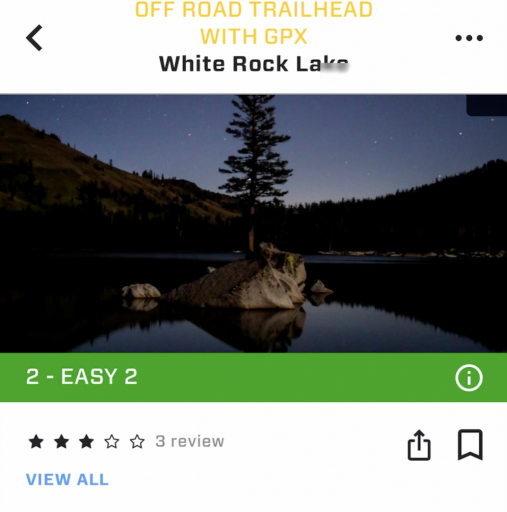
And while complaining about the latest video ;) "3 review" should be pluralized (see screenshot below). Nit, nit, nit, nit, nit ;)
1664013688556.png

You also mention "download GPX" and the "W3W database being included in OB1" - aren't these more "premium" features? If so you should mention that.
 
Just watched this video - thank you! Learn something new with every video! One suggestion ;) It would be _really_ nice if your screen recordings highlighted the button/control that you are clicking on to get to the next screen that you are about to explain. As it is I often have a difficult time seeing just what you poked at to get to the new screen and have to rewind, watch again and possibly rinse and repeat. For instance "go into the actual details screen" @ ~6:53 in this latest POI video.

And while complaining about the latest video ;) "3 review" should be pluralized (see screenshot below). Nit, nit, nit, nit, nit ;)
View attachment 241279

You also mention "download GPX" and the "W3W database being included in OB1" - aren't these more "premium" features? If so you should mention that.
Great suggestions as always. I'll see what kind of tap highlighting apps are out there - I am sure there are some.
 
These short youtube tutorials are really great! Thanks for this!

The POIs can be a great help for all users of the OB1 app. The technical platform that @Michael and team provide here is great and easy to use. Regarding the collection and entry of POIs, each of us should contribute something. So I can only encourage everyone here to contribute and enter POIs. Such a project lives from participation!
 
These short youtube tutorials are really great! Thanks for this!

The POIs can be a great help for all users of the OB1 app. The technical platform that @Michael and team provide here is great and easy to use. Regarding the collection and entry of POIs, each of us should contribute something. So I can only encourage everyone here to contribute and enter POIs. Such a project lives from participation!
Thank you!
 
Not sure if this is the right place to ask this, but didn't see it answered in the tutorial.
Is there a way to edit your "initial rating"? For example, while adding a recent resource I accidentally clicked 3 when I meant to click 5, and I can't find a way to edit the rating.
 
  • Like
Reactions: Corrie
Not sure if this is the right place to ask this, but didn't see it answered in the tutorial.
Is there a way to edit your "initial rating"? For example, while adding a recent resource I accidentally clicked 3 when I meant to click 5, and I can't find a way to edit the rating.
This is the perfect place to ask this!

Took a few days for me to get to this! It's been a week :)

Right now, you cannot edit the rating - I am talking with the team to see if this is something we can expose to edit. I noticed I cannot even edit as an admin!

Video response: