Alpha 0.8.54 Patch Build Notes

Status
Not open for further replies.
Provide report type: Bug
Provide platform: Android 10
Provide Device Info: Pixel 3XL
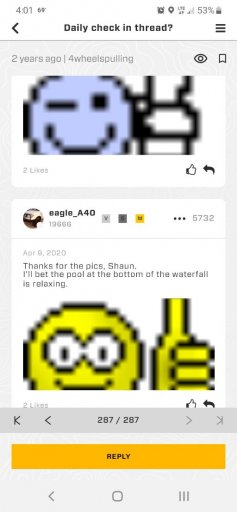
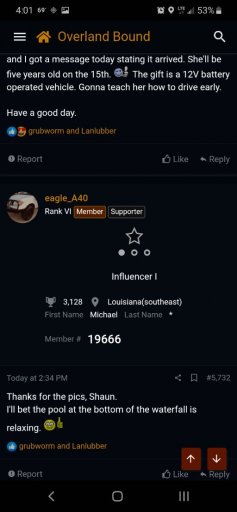
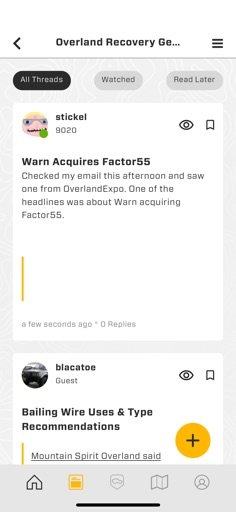
Reproduction steps: issue with photos, see "Overland Trailers" thread screen shot below. Also, recent watched threads don't show up on the app, like this support thread as an example.

Still having an issue with photos. The dots show that there are photos there, and you can scroll or click to see just the photos but nothing ever loads in either scenario.
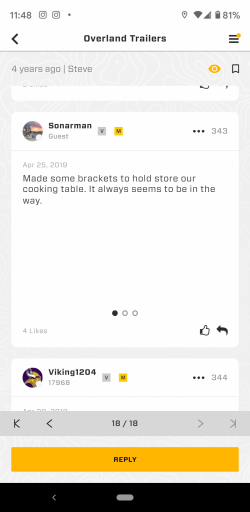
Screenshot_20200409-114838.png
 
  • Like
Reactions: MattLopez-OB
Provide report type: Bug
Provide platform: Android 10
Provide Device Info: Pixel 3XL
Reproduction steps: issue with photos, see "Overland Trailers" thread screen shot below. Also, recent watched threads don't show up on the app, like this support thread as an example.

Still having an issue with photos. The dots show that there are photos there, and you can scroll or click to see just the photos but nothing ever loads in either scenario.

View attachment 148538

Thanks, I will look into this!
 
  • Like
Reactions: dstock
For the all the new beta users, welcome! I'm Matt, and I'm helping test out the app and submit bugs for Michael and the team! Let me know of more known issues, and I will make bug reports about them!

Also, we are aware that Maps and Rally Point cards are "greyed/grayed out", and that's for a future release! Anything that is "greyed/grayed out" is not accessible, and will be for a future release!
Thank you @MattLopez-OB
 
  • Like
Reactions: MattLopez-OB
Only hiccup I have found is when the app is closed it shows it is trying to find location. This seems to be hard on the battery life. I assume it's related to the mapping part of the app being disabled.
Next release, when you first install, it should prompt you for preferred location usage. If you select “only while using the app” it will stop once you exit!
 
Hey, as I was going through the app I got to the update profile section since I saw a mistake under mine and when I clicked the tab to update it , it froze the app on my android. Had to force stop the app twice because it would only come back up on a plain white screen. Other than that I haven't encountered any other issues.
 
  • Like
Reactions: MattLopez-OB
Hey, as I was going through the app I got to the update profile section since I saw a mistake under mine and when I clicked the tab to update it , it froze the app on my android. Had to force stop the app twice because it would only come back up on a plain white screen. Other than that I haven't encountered any other issues.

This is a known issue, and we're working on it! Thanks for the feedback!
 
  • Like
Reactions: Seanblktaco17
Looked over this thread and didn't see it mentioned though I could have over looked it.
Smileys... they are a bit big and some are misplaced.
If this is a dupe or known issue please delete this post.
 

Attachments

  • media.jpg
    media.jpg
    49.8 KB · Views: 17
  • media.jpg
    media.jpg
    56.4 KB · Views: 15
  • Like
Reactions: MattLopez-OB
Looked over this thread and didn't see it mentioned though I could have over looked it.
Smileys... they are a bit big and some are misplaced.
If this is a dupe or known issue olease delete this post.

I'm assuming the one screenshot is from the app, and the one is from the browser version of the forums?
 
Looked over this thread and didn't see it mentioned though I could have over looked it.
Smileys... they are a bit big and some are misplaced.
If this is a dupe or known issue olease delete this post.

I'm assuming the one screenshot is from the app, and the one is from the browser version of the forums?

Correct.
Galaxy A10e
Android 9
 
  • Like
Reactions: MattLopez-OB
Kind of a weird UI issue I noticed after starting a new thread just now:

Device: iPhone 11 Pro
iOS: 13.3.1
Software version: 0.8.54

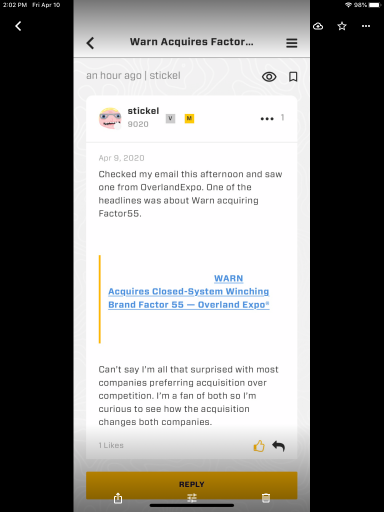
The preview of my thread includes the styles for a link I pasted into the post, but the text isn’t there.

Possible options: remove the link and yellow bar style/graphic or include the link text truncated so it doesn’t look like something is missing
 

Attachments

  • media.jpg
    media.jpg
    25.5 KB · Views: 81
  • Like
Reactions: MattLopez-OB
Provide report type: Bug/Improvement.
Provide platform: Android 10
Provide Device Info: LG G8
Reproduction steps: See video.

So, not sure if it's an intended feature to have every "touch" of elements "flash" but I find it very distracting when using the app. I also noticed it doesn't always happen. sometimes it does it, sometimes it doesn't. Seems random. See video for a demonstration.

 
Kind of a weird UI issue I noticed after starting a new thread just now:

Device: iPhone 11 Pro
iOS: 13.3.1
Software version: 0.8.54

The preview of my thread includes the styles for a link I pasted into the post, but the text isn’t there.

Possible options: remove the link and yellow bar style/graphic or include the link text truncated so it doesn’t look like something is missing

I tested this issue out on my Android phone, and this is what I got.
 

Attachments

  • C0A6A1C9-49AC-46E2-8DC9-B60A4F94C77E.png
    C0A6A1C9-49AC-46E2-8DC9-B60A4F94C77E.png
    758.1 KB · Views: 57
Kind of a weird UI issue I noticed after starting a new thread just now:

Device: iPhone 11 Pro
iOS: 13.3.1
Software version: 0.8.54

The preview of my thread includes the styles for a link I pasted into the post, but the text isn’t there.

Possible options: remove the link and yellow bar style/graphic or include the link text truncated so it doesn’t look like something is missing

I tested this issue out on my Android phone, and this is what I got.

Yeah, if I go to the actual thread it looks like that on iOS as well. The screenshot I took was in the preview mode; the list you see when, for example, you tap “Forums”, then tap the “Participated” pill, and it shows you a preview of the last post made on threads you contributed to.
 
  • Like
Reactions: MattLopez-OB
Bug
Android 10
Lg G8
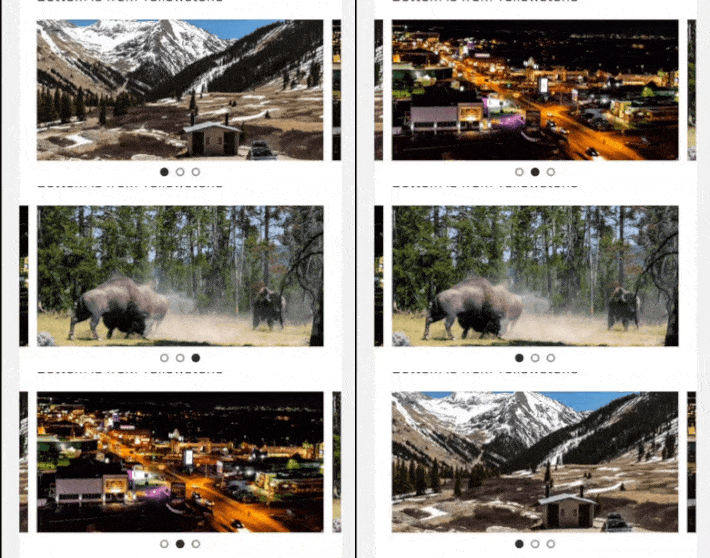
Swipe on preview photos in a thread.

Little circle indicator for which image you are on jumps back to the first image, when swiping through the list. See gif.


a08gOqv.gif
 
Last edited:
  • Like
Reactions: magnusbornes
@Michael I've never participated in a Beta before. What is the best way to report an issue . Is there a better thread or would s bug report be more appropriate? I think this app is a really cool idea and I want to do my part to help it along. Thanks for all you and Corrie are doing.
 
  • Like
Reactions: MattLopez-OB
@Michael I've never participated in a Beta before. What is the best way to report an issue . Is there a better thread or would s bug report be more appropriate? I think this app is a really cool idea and I want to do my part to help it along. Thanks for all you and Corrie are doing.

Hello KHoltzen! If you find any bugs, you can just post them here, and I will do my best to respond, and check to see if I can reproduce it, and then make a bug report to the Dev team! When reporting a bug, remember to include your OS and device type (iPhone or Android phone). Thanks!
 
  • Like
Reactions: M Rose and KHoltzen
Status
Not open for further replies.