Alpha 0.8.54 Patch Build Notes

Status
Not open for further replies.
New message To line.
When typing a user name in the app on the to line of a new message, names with spaces will not resolve.

Create new message in app
Put focus/caret in to line
Type in M and then a space
No users are found even though spaces are valid in user names; at least “M Rose” should have resolved.
 
  • Like
Reactions: Michael
[/QUOTE]
Understood - It is helpful for us to know, but again there is no support for iPads. The current app is for phones in portrait mode only, It kind of works on iPads, but there will be a number of issues.[/QUOTE]

Good to know support is only portrait mode on phones. I was about to post it wouldn’t turn landscape like the iPad!
 
  • Like
Reactions: Michael and Ubiety
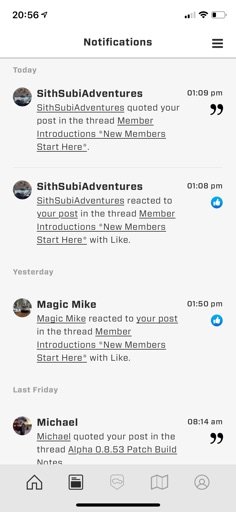
When I click on the notification, it doesn’t take me to the actual post/reply. It takes me to the top of that page that contains the post/reply and I have to scroll down to find the right one.
 

Attachments

  • media.jpg
    media.jpg
    30.8 KB · Views: 17
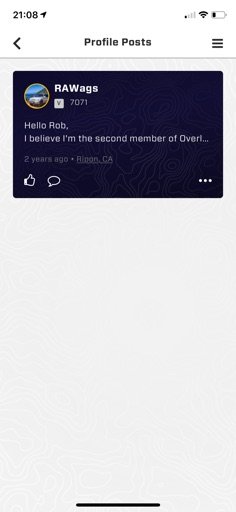
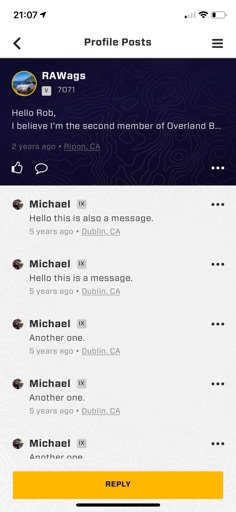
When I look at my Latest Status Updates, I see the one profile post. In this build, I can touch on it and it takes me to a screen with some other dummy posts by Michael. But I can’t see the whole message and none of the actions are live (quote, ellipsis for more, etc.). I can only Like the post - that action does work. Posted some screenshots and the browser view access for reference.
 

Attachments

  • media.jpg
    media.jpg
    19.4 KB · Views: 17
  • media.jpg
    media.jpg
    29.8 KB · Views: 16
  • media.jpg
    media.jpg
    26.8 KB · Views: 15
  • Like
Reactions: Michael
When I look at my Latest Status Updates, I see the one profile post. In this build, I can touch on it and it takes me to a screen with some other dummy posts by Michael. But I can’t see the whole message and none of the actions are live (quote, ellipsis for more, etc.). I can only Like the post - that action does work. Posted some screenshots and the browser view access for reference.
This is using an iPhone X with iOS 13.4.
 
  • Like
Reactions: Michael
I’ve noticed in the last two builds that the locations services are on quite a bit. I limited the app to only have access while I’m using it, but the app seems to be trying or using it a lot anyway. I see the icon in the upper left on my iPhone X with iOS 13.4 almost constantly. Submitting just in case. Thank you.
 

Attachments

  • media.jpg
    media.jpg
    58.2 KB · Views: 17
  • Like
Reactions: Michael and Ubiety
New message To line.
When typing a user name in the app on the to line of a new message, names with spaces will not resolve.

Create new message in app
Put focus/caret in to line
Type in M and then a space
No users are found even though spaces are valid in user names; at least “M Rose” should have resolved.
Great report! Thank you!
 
When I look at my Latest Status Updates, I see the one profile post. In this build, I can touch on it and it takes me to a screen with some other dummy posts by Michael. But I can’t see the whole message and none of the actions are live (quote, ellipsis for more, etc.). I can only Like the post - that action does work. Posted some screenshots and the browser view access for reference.
Good report!
 
I’ve noticed in the last two builds that the locations services are on quite a bit. I limited the app to only have access while I’m using it, but the app seems to be trying or using it a lot anyway. I see the icon in the upper left on my iPhone X with iOS 13.4 almost constantly. Submitting just in case. Thank you.
Agreed! Needs to be only while app is in use! We will change.
 
iPad Pro 11
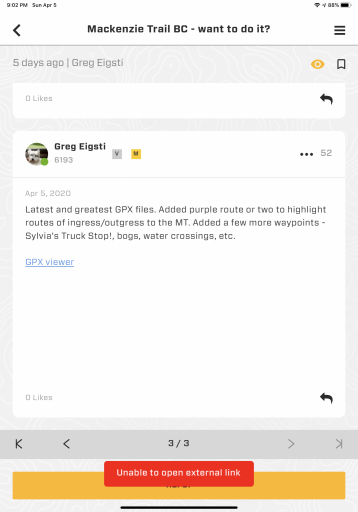
Forum thread ”GPX viewer“ link fails with “unable to open external link” when trying to view an attached GPX file.

View attachment 147671

Hi Greg! I'm Matt and I'm testing out the app myself, and submitting any "bugs" you guys find for Michael so the Dev team can work on them! Can you tell me where this thread is? I tried searching for it, and couldn't find it! Thanks!
 
  • Like
Reactions: Ubiety
Hi Greg! I'm Matt and I'm testing out the app myself, and submitting any "bugs" you guys find for Michael so the Dev team can work on them! Can you tell me where this thread is? I tried searching for it, and couldn't find it! Thanks!
Thank you sir! Thread starts at link, GPX attachments are throughout. Have not tried them all but a couple gave me the same behavior. Believe I tried a random GPX from some other thread and saw the same.

BTW - my GPX is exported from Gaia web site and then placed into my posts via the OB web UI.
 
  • Like
Reactions: MattLopez-OB
Thank you sir! Thread starts at link, GPX attachments are throughout. Have not tried them all but a couple gave me the same behavior. Believe I tried a random GPX from some other thread and saw the same.


Thank you! I'll check it out, and let you know my findings!
 
  • Like
Reactions: Ubiety
Agreed! Needs to be only while app is in use! We will change.

Hi @r2fasani! My name is Matt, and I'm helping out @Michael and the Dev team finding bugs in the App. I've noticed the same issue on Android, but I don't think Android users have an option to limit it to just while being in the App. I will report this issue for both operating systems!

EDIT: You can have this option in Android 10, I still have Android 9.
 
Last edited:
  • Like
Reactions: r2fasani
When I click on the notification, it doesn’t take me to the actual post/reply. It takes me to the top of that page that contains the post/reply and I have to scroll down to find the right one.


Thank you! I have noticed this too! I will submit this as a bug to the Dev team! Let me know of any other issues you find!
 
  • Like
Reactions: r2fasani and Ubiety
Just noticed this and have not narrowed down, sorry.

In the app on my iPad if I go to messages and see a new reply to a message that has not been read, the message shows my profile picture rather than that of the last person to respond to the message. The web UI always shows the profile pic of the last person to respond to that particular message. Two messages, that I noticed, show this behavior - both were to a single recipient and both started by me.

Question - is there a "test forum" that we can make garbage posts to in order to try things out? I'd like to try something but don't want to pollute a real thread. Thanks!
 
  • Like
Reactions: MattLopez-OB
Just noticed this and have not narrowed down, sorry.

In the app on my iPad if I go to messages and see a new reply to a message that has not been read, the message shows my profile picture rather than that of the last person to respond to the message. The web UI always shows the profile pic of the last person to respond to that particular message. Two messages, that I noticed, show this behavior - both were to a single recipient and both started by me.

Question - is there a "test forum" that we can make garbage posts to in order to try things out? I'd like to try something but don't want to pollute a real thread. Thanks!
search “test” lots of test threads... or start your own
 
Just noticed this and have not narrowed down, sorry.

In the app on my iPad if I go to messages and see a new reply to a message that has not been read, the message shows my profile picture rather than that of the last person to respond to the message. The web UI always shows the profile pic of the last person to respond to that particular message. Two messages, that I noticed, show this behavior - both were to a single recipient and both started by me.

Question - is there a "test forum" that we can make garbage posts to in order to try things out? I'd like to try something but don't want to pollute a real thread. Thanks!

I have access to Dev mode, and I can do things like this, that won't show up in Production (things that normal users see). If you would like me to test somethings out, let me know!
 
  • Like
Reactions: Ubiety
I have access to Dev mode, and I can do things like this, that won't show up in Production (things that normal users see). If you would like me to test somethings out, let me know!
Mainly what I was interested in was what happens with lats/lons when embedded in a message (a la GPX viewer in the app). I had seen a lat/lon as a link in a Rally Point event and wondered if I could do the same in a forum post and what would happen in the app. Turns out that lats/lons in forum posts don't turn into links so no issue. Thanks!
 
  • Like
Reactions: MattLopez-OB
Status
Not open for further replies.