Ask About Gaia GPS!

Don’t confuse a track with the term Map. There is no way to share maps, waypoints and tracks yes. Driving directions will bounce you out of Gaia and load either Apple Maps or Google maps to give you those directions. In iOS you can pick which app to use.

Once in Gaia if you download maps for offline use on one device it will sync those map downloads to your other device, for example an iPad but the downloads take the same amount of time and you HAVE to have Gaia open and running for the app to do that. There is no downloading of maps in the background sadly. I think this is an Apple restriction.
Thanks Chris, so what method would you recommend to get from my house to the starting point of the map I uploaded to GAIA?
 
Thanks Chris, so what method would you recommend to get from my house to the starting point of the map I uploaded to GAIA?

Let Gaia load the app of your choice. Nothing wrong with that method. I do it all the time.
 
Edited March 3, 2020

HELLO YES I AM SHOUTING. If this is your first time reading this post welcome. There is LOTs of information on Gaia GPS in this thread. We are hoping you will not create another thread about Gaia GPS. If you ask your question here someone will answer. In fact a few folks will probably chime in. Keeping all of this info in one thread actually makes it easier for new people to learn.

THANKS!

GAIA FAQs -
Q - If I own an iPad do I need an external GPS?
A - If you own a wifi only iPad you will need to add a external Bluetooth GPS to it. There are many brands. Bad Elf, Garmin Glo, Dual GPS to name a few. You can also connect your Garmin InReach to your iPad and use it as the GPS.

If you have a 3G iPad it has a GPS Built in. You don't need to add an external GPS. Nor do you have to have an active cellular plan on your iPad. All iPads with 3G have a built in GPS.

Q - If I own an Android tablet do I need an external GPS?
A - Generally no. Most Android based tablets have a built in GPS.

Q - Do I need to download maps first?
A - Yes - Always download the map layers you want prior to taking any trip! Gaia may cache some maps while you are browsing areas while connected to the internet but you can't rely on this.
For iOS
For Android

One quick way to download maps is Download Maps Along Track or Route - You can pick what layers you want, up to 5, and what level of detail.

iOS - Download Maps Along a Track or Route

Here's a example of the NatGeo layer for the Mojave Road.
View attachment 142759

I sometimes hear complaints that folks wish they didn't have to download maps. They wish Gaia was just like (name a brand) GPS with "all the maps already loaded." Yes, there are devices with some map layer pre-loaded but they do not provide the level of detail and map layer options which Gaia can display. Did you know there are over a dozen different map layers associated with offroad and overland travel? Offroad Maps | Gaia GPS

A little bit of effort and learning can give you a much more powerful tool.

One easy way to give you full map coverage of a state(s) is to download the new and highly improved Gaia Topo Layer. The entire state of AZ, max zoom, is only around 275mb of data. California and a good portion of NV 730mb. This way you will always have at least one layer in Gaia GPS when exploring.

If you aren't a member and would like to subscribe to Gaia GPS I offer a discount on my website, 4xoa.com yes the OB discount is slightly higher but the small affiliate fees I receive from Gaia GPS help pay for my time to write articles and host them.

As a 7 year user and alpha/beta tester for Gaia GPS I thought I would start a dedicated thread so folks can ask about the app and get their questions answered. Let me stress that I am not an employee for Gaia. Merely a long time user and very active with working with them to produce the best GPS app available. Please post up questions, comments, concerns, and suggestions.

While I am here to answer questions there are good official resources at your disposal.

Gaia GPS - Navigate, Track, and Explore - All of the important updates are written about here

r/GaiaGPS - Official support forums

Gaia GPS - Official Help files

If anything changes to the above links I will edit this post. I also hope other Gaia GPS users will chime in to help answer questions.

Gaia is going to make a more dedicated push into the overlanding community this year. I of course fully support these efforts. The best current example would be the future implementation of the MVUM layer. I along with others (THANK YOU) have been asking Gaia to add this feature.

Free 3 Month Premium Subscription Details Here:
Our Navigation App of Choice - Gaia GPS - 4X Overland Adventures

My setup:
Gaia GPS Pro for iOS
iPad Pro 11" with Cellular/GPS
Ram Mount

My old setup:
Gaia GPS Pro for iOS
iPad Air 2
Ram Mount
Delorme InReach Explorer (this is used as the GPS for my iPad)

I have an Android phone for testing purposes and an older Android tablet but am not an expert on everything Android.

Preferred Map Layers:
USFS 2016 and USFS Classic
Gaia Topo
USGS Topo
Gaia Roadmap, Open Streets

All of the available map layers in Gaia GPS.

Map legends now available online - Map Legends

Thanks,
Chris aka 1Louder
thanks I need all the help I can get with GIA I also am trying to figure out if an how to work with my Jeep Gladiator with the better radio an on my ipad.
 
thanks I need all the help I can get with GIA I also am trying to figure out if an how to work with my Jeep Gladiator with the better radio an on my ipad.

If your Jeep has CarPlay it will work with an iPhone. iPads do not work with CarPlay but the iPad app is great!
 
  • Like
Reactions: Traxx
Does anyone know if you can set Gaia to avoid highways like you can with Google maps?

Gaia doesn’t do that type of routing. But when you do manual routing it is pretty easy to do that just based on the type of road. Meaning the road and trails are drawn differently on the Gaia Topo map layer.
 
Gaia doesn’t do that type of routing. But when you do manual routing it is pretty easy to do that just based on the type of road. Meaning the road and trails are drawn differently on the Gaia Topo map layer.
That's how I had been planning my trip, I just didn't know if there was an easier way. I am brand new to Gaia, Thanks Louder
 
  • Like
Reactions: 1Louder
I have been looking everywhere for the map box streets HD layer but I can’t find it. A google search makes it seem like it should be there. I just downloaded the app last week and having been playing with it quite a bit. What am I doing wrong?
 
When I download a map section am I downloading all the layers I have selected ?

Yes, you can see that and confirm this by look at your saved maps folder in the app.
 
  • Like
Reactions: mep1811
I have been looking everywhere for the map box streets HD layer but I can’t find it. A google search makes it seem like it should be there. I just downloaded the app last week and having been playing with it quite a bit. What am I doing wrong?

I believe due to licensing costs Gaia GPS removed this as an option. The alternative is the new enhanced Gaia Streets map.

You can create a developer account with MapBox and then create a custom map layer in Gaia GPS. Basic developer accounts are free but I don't know what the tile limit is per month. I think it is 200,000 tiles per month. Standard pricing is really expensive. As in thousands of dollars per month. I believe that is why Gaia had to remove it.
 
Last edited:
I believe due to licensing costs Gaia GPS removed this as an option. The alternative is the new enhanced Gaia Streets map.

You can create a developer account with MapBox and then create a custom map layer in Gaia GPS. Basic developer accounts are free but I don't know what the tile limit is per month. I think it is 200,000 tiles per month. Standard pricing is really expensive. As in thousands of dollars per month. I believe that is why Gaia had to remove it.

Okay, thanks! I've been using Gaia streets instead. Taking my first trip today using it!
 
As a Canadian in Ontario, I use the Backroad Mapbooks Canada layer almost exclusively. Is there a similar layer for the US ? Or are they divided by states? Is there a recommended brand of layer to add for all states, or does it change state to state?
 
As a Canadian in Ontario, I use the Backroad Mapbooks Canada layer almost exclusively. Is there a similar layer for the US ? Or are they divided by states? Is there a recommended brand of layer to add for all states, or does it change state to state?

Gaia Topo
USFS 2016 and USFS Classic (mostly only available out west)
USGS Topo
NatGeo Trails Illustrated (excellent map layer for places like Death Valley, the Grand Canyon, and now Baja Mexico)
Gaia Roadmap, Open Streets
 
  • Like
Reactions: F8OO
Gia is great, I used to subscribe to is, I just have no use for it at this time, but it is well worth it for hikers.
 
Gaia Topo
USFS 2016 and USFS Classic (mostly only available out west)
USGS Topo
NatGeo Trails Illustrated (excellent map layer for places like Death Valley, the Grand Canyon, and now Baja Mexico)
Gaia Roadmap, Open Streets
Hey, Thank you so much! That really helps! I'm going to start exploring those maps this evening!

Cheers!!
 
Ok I got a question on folders, so I have a folder with a folder in it and a waypoint, how do I move the folder and waypoint out of that mother folder?
 
Ok I got a question on folders, so I have a folder with a folder in it and a waypoint, how do I move the folder and waypoint out of that mother folder?

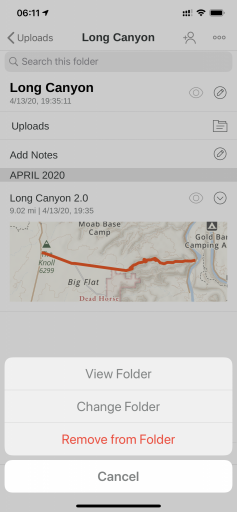
When you open the folder and it shows it under another folder tap that folder name and select Remove From Folder. That will then move it up and out and make it a parent folder.

In the below example the Long Canyon folder is under Uploads. Tap Uploads and then Remove
from folder.

om8B40E066-6FF1-442E-9BE5-0995ED3328F2.png
 
I dont have that option, I am using desktop version if that makes a difference...