GAIA device options

I downloaded Gaia for Android tablets - installed on a Samsung Tab A. It doesn't show my position or movement -just a map. Any ideas? Location services is turned on.


Have you tapped on the crosshairs looking icon at the top right of screen? Tapping once will show your location, twice, it will shows direction of travel towards the top of the map.
 
Any other map app show you on a map? Like Google Maps?

MODS can you merge this into one of the other Gaia threads?
 
Does anyone have a source or time to explain Gaia nav? I have tried using it and I just don’t understand how to use it!
 
  • Like
Reactions: firemen7
I currently have just the free version of the GAIA app on my iPhone and iPad and so far it looks like this will for sure do the trick. I also have just gotten a Panasonic Toughbook CF-31 from work and was wondering if anyone knows if that laptop has an internal GPS sensor for using GAIA offline and if so how to download maps on the web based platform because so far all I can find is how to do it on mobile devices.
 
Gaia is not made to run on Windows. While you can browse your data, plan, and review maps the browser based version of Gaia is not for navigation. Stick with your iPad and get a nice RAM Mount.
 
  • Like
Reactions: darjo242
Gaia is not made to run on Windows. While you can browse your data, plan, and review maps the browser based version of Gaia is not for navigation. Stick with your iPad and get a nice RAM Mount.
That's sort of the route I was leaning anyway after seeing how much those mounts are for a laptop. I was roughly sketching a plan for Overland Expo East and just realized the GAIA doesn't really do navigation at all. So having road maps in the head unit and offroad maps on the iPad is looking like the way to go.
 
That will depend on if you have an iPad with wi-fi only or the cellular version. The wi-fi only versions do not contain a GPS chip and will need an external GPS receiver. If you need an external GPS, there are two options on the market:
  • Bad Elf - GPS Pro [link]
  • Dual Electronics XGPS150A - Universal GPS Receiver [link]
 
  • Like
Reactions: Flipper
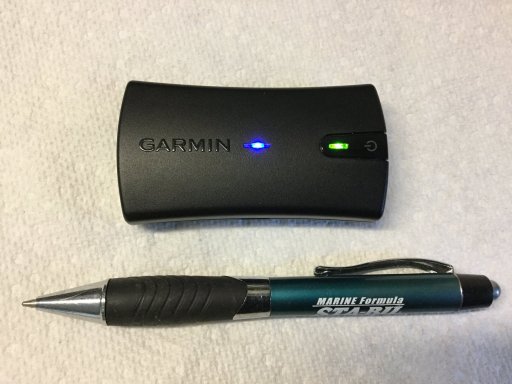
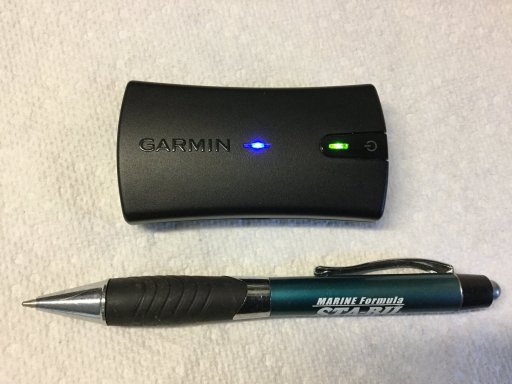
Does your Android have a GPS installed? First tap the top right crosshairs on the Gaia map screen If its not showing altitude and location you probably don’t have a gps. If that’s the case you will have to buy an external gps like the Garmin GLO2 it links via Bluetooth .
 

Attachments

  • 5F6A7B9D-1E57-4C0B-B663-3EC6A993105D.jpeg
    5F6A7B9D-1E57-4C0B-B663-3EC6A993105D.jpeg
    421.1 KB · Views: 30
That will depend on if you have an iPad with wi-fi only or the cellular version. The wi-fi only versions do not contain a GPS chip and will need an external GPS receiver. If you need an external GPS, there are two options on the market:
  • Bad Elf - GPS Pro [link]
  • Dual Electronics XGPS150A - Universal GPS Receiver [link]
Also the Garmin GLO2 works great with my iPad Air 2.EB9BBEB6-902B-4223-B577-16F8656544B4.jpeg
 
  • Like
Reactions: Jedi
I currently have just the free version of the GAIA app on my iPhone and iPad and so far it looks like this will for sure do the trick. I also have just gotten a Panasonic Toughbook CF-31 from work and was wondering if anyone knows if that laptop has an internal GPS sensor for using GAIA offline and if so how to download maps on the web based platform because so far all I can find is how to do it on mobile devices.


It is possible to run GAiA on a Windows machine if you run an Android emulator such as Blue Stacks Android on PC and Mac - Play Games and Apps - Live Stream I know it runs on the emulator. I do not know about GPS on the laptop though so that would be a big hurdle to overcome.

I have a Dual XGPS150 that I use with my older iPad. I have also used it with a phone I had poor GPS with. Worked well. I never did try using it with a laptop though. That could be interesting.
 
So long story short, If I use an ipad for Gaia It needs to be activated like my phone? Im not a huge tech guy, which is why Im asking.
Short answer no.

Make sure your iPad is Cell capable. Settings is a good place to look, but also up top near the power button the case will have an area that is slightly different from the rest of the case. That area is the cell antenna area and will be almost a wide as your iPad's back shell.

You do not have to have an active cell data plan for your iPad to receive GPS signals.

If your iPad is not cell capable, then you can tether it with bluetooth to a device like the Garmin Inreach. I have the Garmin Inreach, so I don't really know if other GPS devices offer tethering. Have not looked.

Just make sure that you down load all the maps you need before you leave home. Even if you have a cell data plan, because you will not always be in range of a cell tower.
 
  • Like
Reactions: Jedi
So long story short, If I use an ipad for Gaia It needs to be activated like my phone? Im not a huge tech guy, which is why Im asking.

Short story:
WiFi in iPad has no GPS built in. If you own that you need to add a Bluetooth GPS as listed above.

iPad with cell service has a built in GPS regardless if you have a cellular plan or not. Meaning you don’t need a Bluetooth GPS.

The term activated does apply here. Just to avoid any confusion.

CTO beat me to the answer.
 
  • Like
Reactions: Jedi