Overland Bound Talk- File sizes stores on my phone. Anyone else seeing this? It's taking up 1.5gb

rmerron

Rank V
Founder 500
Launch Member

Pathfinder I

2,268
Scottsboro, Alabama, USA
First Name
Ralph
Last Name
Peters
Member #

0460

Service Branch
US Army
Anyone having issues with this site storing large amount of data on their devices?
 
Similar here. 1.6gb; fifth largest storage use on my phone. My hunch is that the app stores all downloaded images from forum posts viewed and isn't doing a good job of cleaning up after itself.
 
I check the app throughout the day, read updates etc...

I just checked the storage and it is 155mb. I wonder if it is a setting on your phone. I have to have @1Louder and my son tell me what to do with my phone.
 
Not sure either, but it's taking up a lot of storage, if I cannot figure it out Om going to delete this app. Need the space, my phone is full and I do not have slot of pics on here, but I need space for off line maps. Thanks
 
Not sure either, but it's taking up a lot of storage, if I cannot figure it out Om going to delete this app. Need the space, my phone is full and I do not have slot of pics on here, but I need space for off line maps. Thanks
I'll look into it. I think it may be a phone setting. What OS/Phone do you have?
 
Not sure either, but it's taking up a lot of storage, if I cannot figure it out Om going to delete this app. Need the space, my phone is full and I do not have slot of pics on here, but I need space for off line maps. Thanks
Are you running Tapatalk or Overland Bound Talk?
 
Not sure either, but it's taking up a lot of storage, if I cannot figure it out Om going to delete this app. Need the space, my phone is full and I do not have slot of pics on here, but I need space for off line maps. Thanks
I check a lot, have an iPhone 6 and the OB Talk App uses 152MB of space.
 
Not sure if it's cashing the photos I'm posting. 1.5 GB seems like a lot. I checked my settings, cannot find anywhere ai can affect the data storage
 
I am running the OB Talk app on an iPhone. I removed the app this morning and reinstalled. With light browsing today the reported storage used went from under 100k to over 200k. It seems like it will keep growing as more photos and videos are viewed in the app. Before I removed the app this morning it was reporting more than 1.5 gb used.
 
Well I think the app in general takes up a lot of space, second only to Facebook on mine.
Do to the nature of it idk if theirs a lot @Michael could do to compress it.
 
Well I think the app in general takes up a lot of space, second only to Facebook on mine.
Do to the nature of it idk if theirs a lot @Michael could do to compress it.

I was surprised to see the size of it as well. It's 180mb on my iPad and I've never even opened it. I just dumped all of my music to make room for maps and movies and will have to keep an eye on it.
 
Strange guys. I'll look into this further. I post a lot, and I'm on the app quite a bit. Mine is 155 MB. I'll check how the app is caching pics and see if there is something to be done on our end. Thanks for bringing this up.
 
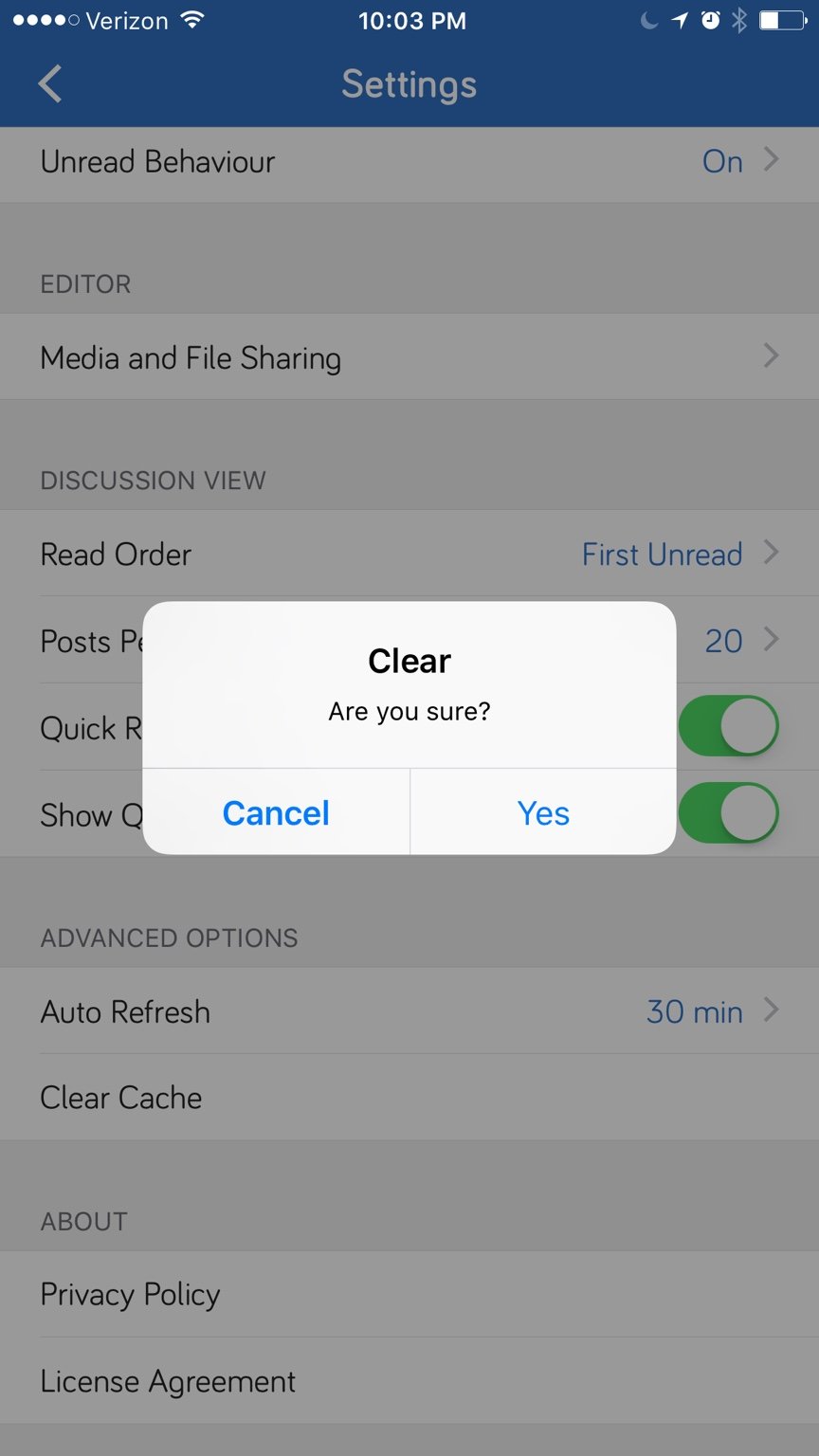
The solution on iOS is to go in the OB Talk app and access the settings from the menu. In there you will find a "Clear Cache" option near the bottom.

18db397ac648ccfc0c3ed1904b421650.jpg


Using this, I reduced storage from 440mb to 97mb tonight. I did not find an option to have the cache cleared automatically, so you just have to remember to do it periodically.

Cheers
 
I had both & found it to be too overwhelming, same notifications twice per device

while we are on the topic of notifications I have every possible email notification disabled here & I still continue to receive email updates all day long

I'm lost as to why the changes dont take effect, is this a software glitch?

or how do I correct it short of removing my email address on file, please advise & thanks
 
  • Like
Reactions: Michael