OB1 App Feedback - Nits - Suggestions

Hey all,

If you have an idea or nit or something about the app to talk about - this is the place. Please keep in mind, the BEST way to actually get a feature upvoted and developed is to use our upvote feature.


however - if you would like to discuss a potential feature, get some feedback, or just let me know how to make the app better for your use - post away.

-Michael

Superb app, great developments! I addded some more ideas to the list.

Bjoern

Thank you!
 
  • Like
Reactions: El-Dracho
Hej youse, sweet app. One suggestion:
It would be awesome if you would unlock the option to click on followed and follow in your profile section to have easy access to your close OB member. This would make it easy handier to stay in contact.

Cheers and best regards from Hamburg.

We have this in the queue, as well as more social features for people you follow!
 
Hej youse, sweet app. One suggestion:
It would be awesome if you would unlock the option to click on followed and follow in your profile section to have easy access to your close OB member. This would make it easy handier to stay in contact.

Cheers and best regards from Hamburg.

We have this in the queue, as well as more social features for people you follow!

Great news. Always excited about updates. Keep pushin‘
 
Hey all a new addition of a community-requested feature submitted by @El-Dracho has been implemented for next release. Map Measure.

This is what we came up with:

View attachment 226891
If you have suggestions: Community Feature Priority for Overland Bound One

Features are not only prioritized by popularity, but also by dev effort and many other things. They will not necessarily be completed in order of popularity.

This is a good one!

M

Great idea! Love also seeing KM there!
 
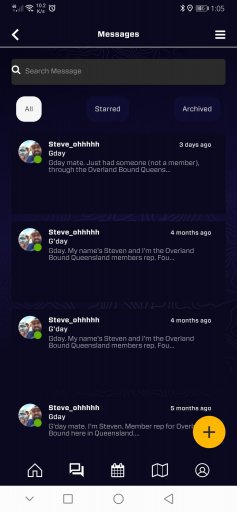
When using the messages feature it doesn't list who you actually messaged. Make it hard when you are looking for a particular message you have sent.
... And while adding this post the option to add a picture/screen shot did not work. I was able to select from my gallery but it did not show in the post.
 
When using the messages feature it doesn't list who you actually messaged. Make it hard when you are looking for a particular message you have sent.
... And while adding this post the option to add a picture/screen shot did not work. I was able to select from my gallery but it did not show in the post.

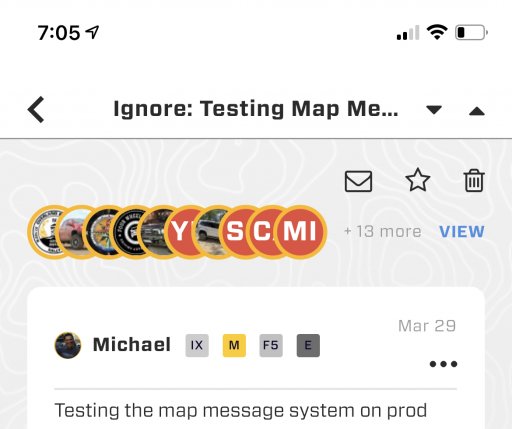
Hey Steve! Messaged members should show at the top of the screen. You can click ‘view’ to see a list of people. Do you see that?

For photo attachment, can I get your phone type. Thank you!
 

Attachments

  • media.jpg
    media.jpg
    309.8 KB · Views: 36
When using the messages feature it doesn't list who you actually messaged. Make it hard when you are looking for a particular message you have sent.
... And while adding this post the option to add a picture/screen shot did not work. I was able to select from my gallery but it did not show in the post.

Hey Steve! Messaged members should show at the top of the screen. You can click ‘view’ to see a list of people. Do you see that?

For photo attachment, can I get your phone type. Thank you!

Hi Michael.
There is nothing like you describe to show who I've messaged.

Phone is Huawei Mate 20 pro. Android 10. Current OB1.

If you'd like I can screen shot and record a couple things and use my laptop on the online forums to share.
 
  • Like
Reactions: Michael
When using the messages feature it doesn't list who you actually messaged. Make it hard when you are looking for a particular message you have sent.
... And while adding this post the option to add a picture/screen shot did not work. I was able to select from my gallery but it did not show in the post.

Hey Steve! Messaged members should show at the top of the screen. You can click ‘view’ to see a list of people. Do you see that?

For photo attachment, can I get your phone type. Thank you!

Hi Michael.
There is nothing like you describe to show who I've messaged.

Phone is Huawei Mate 20 pro. Android 10. Current OB1.

If you'd like I can screen shot and record a couple things and use my laptop on the online forums to share.

10 is a bit long in the tooth but should work OK. A screenshot would be great.
 
10 is a bit long in the tooth but should work OK. A screenshot would be great.
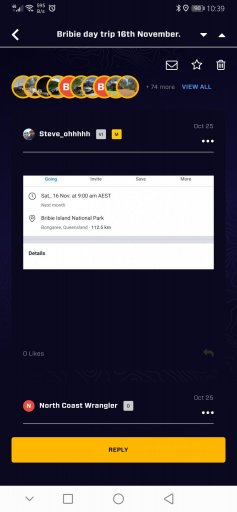
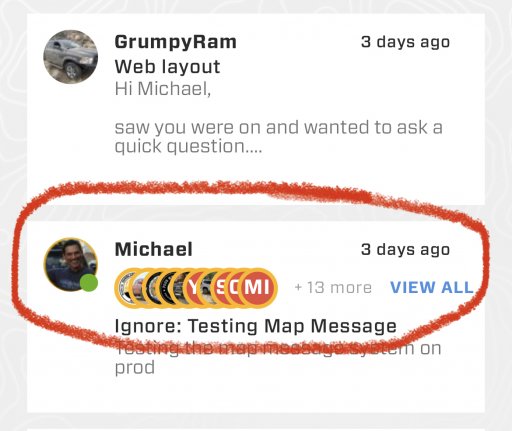
Ok so there's this, which looks like your example. That is from sending out a message to a group of people like in a rally point.
Screenshot_20220402_103903_com.overlandbound.ob1.jpg

However what I'm trying to show is in the messages list it does not show who your recipient is.
Screenshot_20220401_130514_com.overlandbound.ob1.jpg
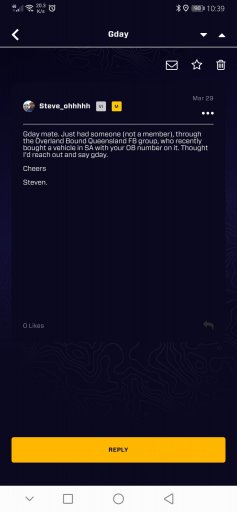
And even when you go in to the message it doesn't show the recipient.
Screenshot_20220402_103924_com.overlandbound.ob1.jpg
 
10 is a bit long in the tooth but should work OK. A screenshot would be great.
Ok so there's this, which looks like your example. That is from sending out a message to a group of people like in a rally point.
View attachment 226973

However what I'm trying to show is in the messages list it does not show who your recipient is.
View attachment 226974
And even when you go in to the message it doesn't show the recipient.
View attachment 226975

Ah! A picture is worth a thousand words! Yes, any group message in the message list should look like this. I’ll get this to developers.
 

Attachments

  • media.jpg
    media.jpg
    466.5 KB · Views: 98
  • Like
Reactions: Steve_ohhhhh
Hey all a new addition of a community-requested feature submitted by @El-Dracho has been implemented for next release. Map Measure.

This is what we came up with:

View attachment 226891

If you have suggestions: Community Feature Priority for Overland Bound One

Features are not only prioritized by popularity, but also by dev effort and many other things. They will not necessarily be completed in order of popularity.

This is a good one!

M

Just updated the app and tried the new feature to measure a distance - works perfectly, great solution! And the new full screen mode feature is also very helpful.
Thank you!
Bjoern
 
  • Like
Reactions: XC70_OVERLANDER
Not sure if this is the works but, when getting a push notification, can you also attach the message itself and not just say "X quoted your post"?
 
  • Like
Reactions: Michael
Feedback! Bring it!

Hi Michael,

When performing a search in messaging section, I noticed some of the members are not showing up in the search results. Also, over the last few years I have directed folks to reach out to me on the OB app by looking up my OB ID. I realize now that I have not received very many responses. Could this be due to an issue with the search function (or do folks just think I'm weird and are avoiding me lol)?