

Benefactor
- 15,584
- First Name
- Michael
- Last Name
- Murguia
- Member #
0000
- Ham/GMRS Callsign
- KM6YSL
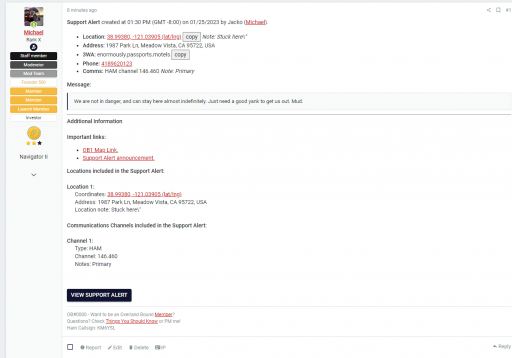
Hey all - here is the final Support Alert post generated when a Support Alert is created:
Benefactor
0000


Off-Road Ranger I
29302
Looks Great!Hey all - here is the final Support Alert post generated when a Support Alert is created:


Trail Blazer III
20527


Trail Mechanic III
29878
Benefactor
0000
Benefactor
0000


Protector III
20111
Benefactor
0000
Trail Blazer III
20527
Michael, is there a radius from the geolocation that you send the alert from that members will be notified? assuming it is only those that have selected 'helper' on their profile? does it also go to staff, i.e HQ, Directors and member reps? Thank youOK all! The build has been released and should be available in the app stores. "Support Alert" is available in the slide out menu. Remember, creating a Support Alert will notify real members, so be sure to say "TEST ONLY" in the title. it would be good to get a couple of test from you guys. Maybe in areas that are fairly remote so you are not spamming.
Thank you!
M
Benefactor
0000
Hi Dave, we try to find 50 within 100 miles and if not we expand the radius. Currently the limit is set to a 500 mile diameter.Michael, is there a radius from the geolocation that you send the alert from that members will be notified? assuming it is only those that have selected 'helper' on their profile? does it also go to staff, i.e HQ, Directors and member reps? Thank you
Trail Blazer III
20527
Thank you, Thread followed and heading off to make sure OB app is updated. Thank you for your continued work on this project!Hi Dave, we try to find 50 within 100 miles and if not we expand the radius. Currently the limit is set to a 500 mile diameter.
We have not yet provided a specific on/off for the Support Alert system. Reps and Admins can be notified with a push note regardless of location by following the Support Alert thread. No matter where in the world the SA is created, an update or new thread in that forum will trigger a push note through the app.
Protector III
20111
OK all! The build has been released and should be available in the app stores. "Support Alert" is available in the slide out menu. Remember, creating a Support Alert will notify real members, so be sure to say "TEST ONLY" in the title. it would be good to get a couple of test from you guys. Maybe in areas that are fairly remote so you are not spamming.
Thank you!
M
Benefactor
0000
:/ heck - OK - testing here.Great! Thank you.
@Michael Just wanted to check it out. Unfortunately, when I tap on the "Support Alert" button in the slide out menu and the fields appear and then after about a second the app crashes, i.e. closes. Samsung phone, Android 11, OB1 App version I just wanted to check, but now the app already crashes when I even open the slide out menu. Mmhh, what happens there?
Protector III
20111
:/ heck - OK - testing here.
Benefactor
0000
Can you see if you can access the feature through the regular Rally Point Create path in app? Type = Support Alert.Great! Thank you.
@Michael Just wanted to check it out. Unfortunately, when I tap on the "Support Alert" button in the slide out menu and the fields appear and then after about a second the app crashes, i.e. closes. Samsung phone, Android 11, OB1 App version I just wanted to check, but now the app already crashes when I even open the slide out menu. Mmhh, what happens there?
Protector III
20111
Can you see if you can access the feature through the regular Rally Point Create path in app? Type = Support Alert.
Benefactor
0000
OK - we are getting close to a cause. It is the Support Alert RP type. Thankfully this does not occur on my Android device, so at least it is not all devices. Can you give me your App version?Yes, I can see the form then, select "support alert" and again also here the app crashes after one or two seconds.
Protector III
20111
Benefactor
0000
Bjoern, I am going to take this to a support thread. I will @mention you.So I checked other functions, it is always the same, the app crahes after a while. This is since the update. I will do a reboot of the phone now and check again.
Protector III
20111
OK all! The build has been released and should be available in the app stores. "Support Alert" is available in the slide out menu. Remember, creating a Support Alert will notify real members, so be sure to say "TEST ONLY" in the title. it would be good to get a couple of test from you guys. Maybe in areas that are fairly remote so you are not spamming.
Thank you!
M

