Can't use the app properly - buttons overlaid by the phone controls

CR-Venturer

Rank VI
Launch Member

Traveler III

3,372
Ardrossan, AB, Canada
First Name
Jas
Last Name
Spr
Member #

16340

I have a Moto G5 phone, and recently, after a system update, I can't use the app functions properly because all the buttons on the bottom ribbon of the app are superimposed by the three default phone controls (the back arrow, the circle and the multi windows button, whatever they're called). Anytime I open the app and try to hit, say, the forums button on the bottom ribbon, it closes the app. Incredibly frustrating. Hoping someone can help somehow.

Cheers!
 
Unfortunately, this can happen with apps and is not necessarily inherent to the OB1 app. The app's controls are then overlapped by the soft keys of the system.

Depending on the device, operating system and version, I have experienced this on some of my devices but not on others also.

But maybe @Michael will have a solution for this with the next update?
 
Unfortunately, this can happen with apps and is not necessarily inherent to the OB1 app. The app's controls are then overlapped by the soft keys of the system.

Depending on the device, operating system and version, I have experienced this on some of my devices but not on others also.

But maybe @Michael will have a solution for this with the next update?

Forgot to mention, I tried reinstalling the app to no avail.
 
  • Like
Reactions: Edward Hard
I have the same issue with the current version on Google pixel 9 pro
 
I have a Moto G5 phone, and recently, after a system update, I can't use the app functions properly because all the buttons on the bottom ribbon of the app are superimposed by the three default phone controls (the back arrow, the circle and the multi windows button, whatever they're called). Anytime I open the app and try to hit, say, the forums button on the bottom ribbon, it closes the app. Incredibly frustrating. Hoping someone can help somehow. :angry:

Cheers!

That sounds really frustrating! It might be a navigation bar overlay issue after the update. Try enabling full-screen or gesture navigation in settings.
 
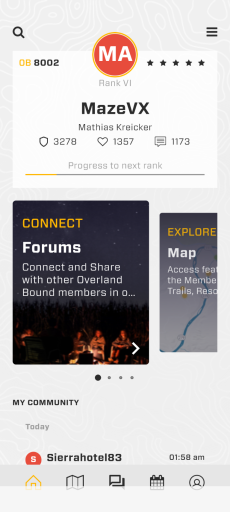
I also still have an overlay but was able to actually reach the button for homescreen. Usually the app decides whether it runs in full screen or not, no real way to make adjustments, at least on pixel 9 or stock androids which makes sense because Motorola also uses a almost stock android. Screenshot_20251101-100213.png
 
  • Like
Reactions: CR-Venturer
I also still have an overlay but was able to actually reach the button for homescreen. Usually the app decides whether it runs in full screen or not, no real way to make adjustments, at least on pixel 9 or stock androids which makes sense because Motorola also uses a almost stock android. View attachment 296229

Asking the most basic question I realize, we had a new android release a few days ago. Did you update and try it?
 
I also still have an overlay but was able to actually reach the button for homescreen. Usually the app decides whether it runs in full screen or not, no real way to make adjustments, at least on pixel 9 or stock androids which makes sense because Motorola also uses a almost stock android. View attachment 296229

Asking the most basic question I realize, we had a new android release a few days ago. Did you update and try it?

I am on the most actual version of the OB1 App.

However, This bug seems to have something to do with the Android or version.

With Android 16 with most recent patch I still have a slight overlap, so that it is possible to manage to get to the buttons even if it is not convinient and with an older Android version on my tablet it works perfectly.
 
  • Like
Reactions: MazeVX
Asking the most basic question I realize, we had a new android release a few days ago. Did you update and try it?
Currently installed is 11.26.1 and no update shown. And I'm on the latest android build for pixel 9 pro.
 
  • Like
Reactions: El-Dracho