Ask About Gaia GPS!

Is there a way to view distances between waypoints on a route after being saved? I just finished a route and wanted to see the distance between the start and my 1st campsite. Is the only way to do it is with the As the crow flies function?

Also anyway to make the notes from a waypoint pop up when driving the route?

No only as the crow flies by tapping on the waypoint or using Guide Me.

Same for notes you have to tap on the waypoint and then look at the details. No auto anything.
 
  • Like
Reactions: PonoAdventures
Is there a way to view distances between waypoints on a route after being saved? I just finished a route and wanted to see the distance between the start and my 1st campsite. Is the only way to do it is with the As the crow flies function?

Also anyway to make the notes from a waypoint pop up when driving the route?

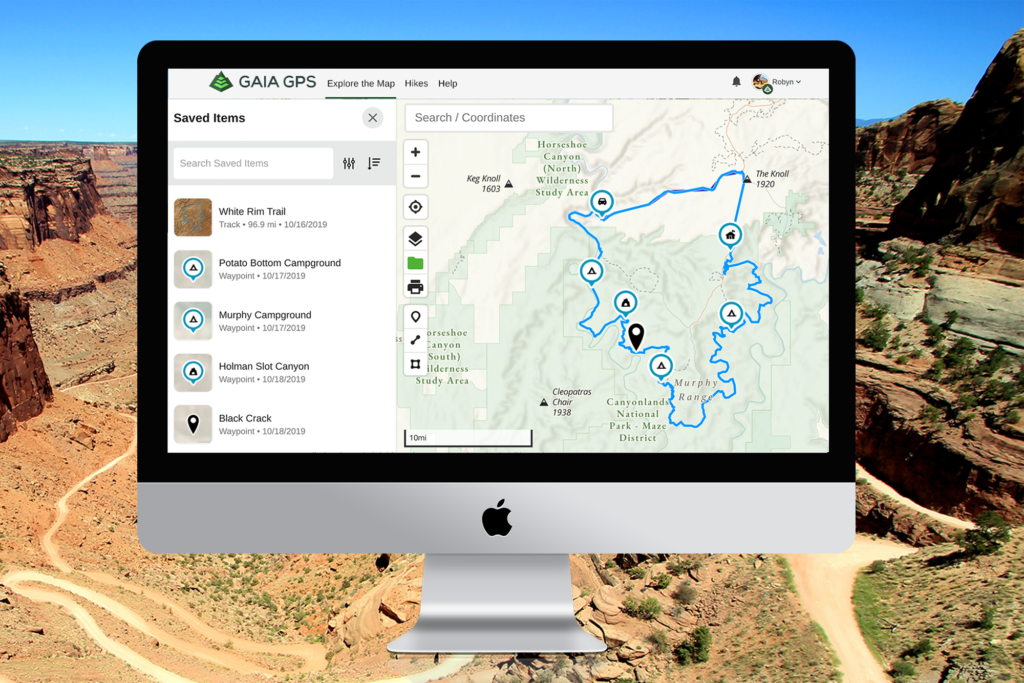
I've started building my routes by day-runs and placing the day-runs in a folder. This way I have potential dailies and can open the entire route as a folder.
Example: route name day 1, route name day2, etc... then folder as route name.
 
  • Like
Reactions: M Rose
General use
I've started building my routes by day-runs and placing the day-runs in a folder. This way I have potential dailies and can open the entire route as a folder.
Example: route name day 1, route name day2, etc... then folder as route name.
What advantage do you find In breaking a “trip” into daily folders over placing your different routes/tracks in the same folder? I use folders to manage entire trips but have never broken down any further (e.g. daily).
 
General use

What advantage do you find In breaking a “trip” into daily folders over placing your different routes/tracks in the same folder? I use folders to manage entire trips but have never broken down any further (e.g. daily).

Sorry, may not have been clear.. Daily is a file then the multiple files placed into a folder.

By this, I have a daily run that I can notate, I know the distance of that run and hopefully easier to deal with as the actual track is made. I'm still playing with all this to work out a system that works for me.
 
Ok, that makes much more sense to me! Folders are great for trip planning!

I was having issues in several levels of route planning, then as I worked through those I found I was still asking myself questions after the fact. The folders option I found to be very handy. My only disappointment is if you open a folder (laptop) you get a small window to view. Going into full screen brings back everything else. Haven't found a work around for that yet..
 
I was having issues in several levels of route planning, then as I worked through those I found I was still asking myself questions after the fact. The folders option I found to be very handy. My only disappointment is if you open a folder (laptop) you get a small window to view. Going into full screen brings back everything else. Haven't found a work around for that yet..
Yep, you have to view the full screen and not the individual route screen, but you can get to the main map from any folder screen so that does not bother me much. Recently I have been taking advantage of Gaia's ability to hide stuff; makes some map work a little less distracting. Though when I am on the trail I have Gaia really zoomed in so clutter is typically not a problem outside of planning at home on the computer.
 
  • Like
Reactions: RJ Howell
Sorry, may not have been clear.. Daily is a file then the multiple files placed into a folder.

By this, I have a daily run that I can notate, I know the distance of that run and hopefully easier to deal with as the actual track is made. I'm still playing with all this to work out a system that works for me.

Thats what I ended up doing. I broke it into 3 days routes and put in the folder. I still kept the total routes since it had all my waypoint notes so I can still see where a caution area is coming up.
 
  • Like
Reactions: RJ Howell
I’m new to using Gaia, but not to nav software. I’m having an issue with planning routes online to follow the Level 2 forest roads when selecting a Driving route. Is this normal, or am I missing something? The route never seems to snap to the trail I want.
 
I’m new to using Gaia, but not to nav software. I’m having an issue with planning routes online to follow the Level 2 forest roads when selecting a Driving route. Is this normal, or am I missing something? The route never seems to snap to the trail I want.

If it won’t snap try smaller distances between your points. Sometimes you have to make them really small or the app will route way around something. It is most based on data from OpenStreets so accuracy can very.
 
I’m new to using Gaia, but not to nav software. I’m having an issue with planning routes online to follow the Level 2 forest roads when selecting a Driving route. Is this normal, or am I missing something? The route never seems to snap to the trail I want.

If it won’t snap try smaller distances between your points. Sometimes you have to make them really small or the app will route way around something. It is most based on data from OpenStreets so accuracy can very.
I’ve tried what I thought was small enough increments but will try again and see. Thanks!
 
I’ve tried what I thought was small enough increments but will try again and see. Thanks!
Sometimes if you hold the next point of our your line on the road (before clicking to drop make the point) it will auto fit - this is handy to help figure out if Gaia is going to be able to route for you on that particular road. If you were getting a route auto fit to a road and then it stops auto-fitting you may have found something that confuses the routing and you have to click a bit of a manual route to get past that point and auto fit will start working again. Ran into this with a detour recently on a main road. Otherwise I am pretty impressed with the ability to route a lot of dirt roads.
 
Sometimes if you hold the next point of our your line on the road (before clicking to drop make the point) it will auto fit - this is handy to help figure out if Gaia is going to be able to route for you on that particular road. If you were getting a route auto fit to a road and then it stops auto-fitting you may have found something that confuses the routing and you have to click a bit of a manual route to get past that point and auto fit will start working again. Ran into this with a detour recently on a main road. Otherwise I am pretty impressed with the ability to route a lot of dirt roads.
So, I've been using the USFS Road and Trails map, and that might be part of the problem based on the comment above about Gaia using OpenStreetMap. The areas I was looking with the USFS map has the roads I'm trying to route. Whenever I let the next point hover, the line doesn't snap to the trail, it just. keeps a straight line to where my cursor is. But, if I switch to the Gaia Satellite map, the roads aren't there at all. That must be why it's not working like I expected. I can still map it, but it will just be a whole bunch of short, straight segments.
 
  • Like
Reactions: Ubiety and 1Louder
So, I've been using the USFS Road and Trails map, and that might be part of the problem based on the comment above about Gaia using OpenStreetMap. The areas I was looking with the USFS map has the roads I'm trying to route. Whenever I let the next point hover, the line doesn't snap to the trail, it just. keeps a straight line to where my cursor is. But, if I switch to the Gaia Satellite map, the roads aren't there at all. That must be why it's not working like I expected. I can still map it, but it will just be a whole bunch of short, straight segments.
Your mileage will vary with auto routing when you get to dirt roads, some are routable others are not. I believe Gaia makes calls to a third party to do the auto routing so it not likely dependent upon Gaia maps rather the third party's data and ability to route that particular segment.
 
Well I started out in one direction and turned in another with Gaia. I was working on APRSGTE and while getting all the gear together realised the the Samsung tablet needed could also do mapping. I have been using a dedicated Garmin GPS for a few years and Lowrance before that. I think the tablet is going to replace the Garmin though the track recording on it is way simpler. Glad I stumbled upon this resource and no I have some reading to do while in hibernation.
 
  • Like
Reactions: Ubiety
Well I started out in one direction and turned in another with Gaia. I was working on APRSGTE and while getting all the gear together realised the the Samsung tablet needed could also do mapping. I have been using a dedicated Garmin GPS for a few years and Lowrance before that. I think the tablet is going to replace the Garmin though the track recording on it is way simpler. Glad I stumbled upon this resource and no I have some reading to do while in hibernation.
Awesome! Loving my ipad in the jeep! Keep the Garmin handheld - still great for hikes and as a backup.
 
Sometimes if you hold the next point of our your line on the road (before clicking to drop make the point) it will auto fit - this is handy to help figure out if Gaia is going to be able to route for you on that particular road. If you were getting a route auto fit to a road and then it stops auto-fitting you may have found something that confuses the routing and you have to click a bit of a manual route to get past that point and auto fit will start working again. Ran into this with a detour recently on a main road. Otherwise I am pretty impressed with the ability to route a lot of dirt roads.

Hovering over we're you are about to snap/click works pretty well to see if it's going to work. Working on back roads/wood roads, you will still get those spots that it just won't fill. What I found (and mentioned to Gaia) is that some of those routes just are not passable (like bridge out or gated). I am starting to see icons showing some of this. I've confirmed a few spots now that I hoped as a route.
 
  • Like
Reactions: BchBum11511
I noticed an odd thing on my map there is a line that is somewhat angular that cuts the topo it is labeled with numbers like 1.5 2.0 show on the boundary of the lines. Not topo. Not even elevation group lines are straight. But irregular.and don’t show up on my old iPad 2 they are on the Gaia base topo? Any ideas?
 
I noticed an odd thing on my map there is a line that is somewhat angular that cuts the topo it is labeled with numbers like 1.5 2.0 show on the boundary of the lines. Not topo. Not even elevation group lines are straight. But irregular.and don’t show up on my old iPad 2 they are on the Gaia base topo? Any ideas?

Have me curious! What layers do you have open? Can you do a screen shot (if not tell us the area you're looking at)?