Ask About Gaia GPS!

I picked up a WiFi only iPad mini to hopefully work with my Garmin Inreach Mini. From what I've read, I should be able to use the Inreach GPS functions without a subscription. I already installed the Gaia app.

That's exactly how I use my setup. I pre-download the area maps on Gaia and then uses the inReach to pass GPS info to my iPad. Works like a charm and very accurate.
 
  • Like
Reactions: Ubiety
That isn't true. I use my InReach Mini to pass GPS info to my iPad Mini all the time.

I'll be damned - Is this new functionality? I remeber researching this and even emailing Garmin and being told it wasn't possible. I was going to get an InReach to replace my GLO2 and kill two birds with one stone. I feel like I'm taking crazy pills.
 
  • Haha
Reactions: RoarinRow
That isn't true. I use my InReach Mini to pass GPS info to my iPad Mini all the time.

I'll be damned - Is this new functionality? I remeber researching this and even emailing Garmin and being told it wasn't possible. I was going to get an InReach to replace my GLO2 and kill two birds with one stone. I feel like I'm taking crazy pills.

This isn't something new. I have been using it this way for a couple of years now.
 
  • Like
Reactions: Ubiety
Basic watch functionality has been a feature for a while - but this looks greatly improved! Thanks for passing along! I like the watch interface for hiking.
Having GPS navigation on the watch would be very convenient, more hands free to do other stuff.
 
  • Like
Reactions: Ubiety
Hi, newbie here. Anyone know if I can display a route I make on apple car play? Or is just the map layer on my phone displayed?

Whatever map layer you select will display. So will routes. CarPlay is simply mirroring what is on your phone.
 
  • Like
Reactions: Barbs401


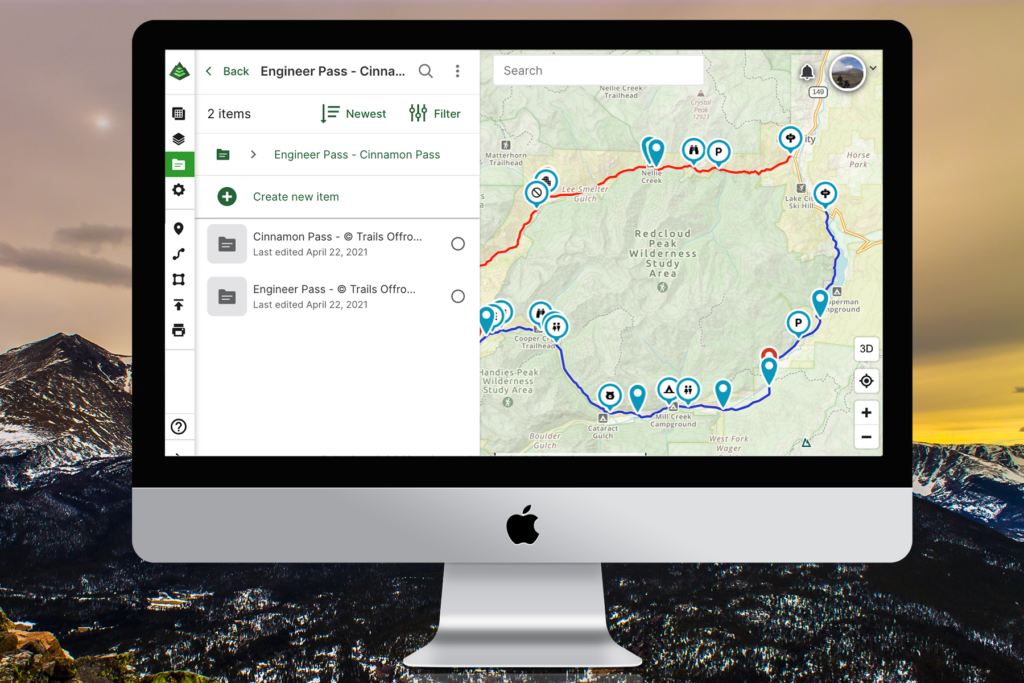
Gaia apparently just updated their folder setup. I think it only affects those using it on the computer.

Just thought I would pass this on, hopefully I’m in the right place


Gaia apparently just updated their folder setup. I think it only affects those using it on the computer.

Just thought I would pass this on, hopefully, I’m in the right place

I am reviewing it now. I have always found folder management easier from within the app. Maybe this will change with the new web improvement. They still need to allow for a full-screen view of a given folder WITHOUT showing all of your other data. If I have 100 well-organized folders I don't want to have to turn off the visibility for dozens of them to just get a clean view.

In other news Emoji waypoints are coming soon. Meaning you can use any Emoji on your phone as a waypoint icon. That will be nice. Currently, it is in beta.
 
Let me ask here. I'm looking to send .gpx of an area I choose. I have a file that has a multitude of tracks/routes and looking to share a portion of, as in a area. As of yet, I've failed doing it..
Suggestions of ways to try?
 
Let me ask here. I'm looking to send .gpx of an area I choose. I have a file that has a multitude of tracks/routes and looking to share a portion of, as in a area. As of yet, I've failed doing it..
Suggestions of ways to try?

There are several ways you can do this. Download the tracks and waypoints you want to share, then email them to the people you want to share them with. They can then import the data into whatever app they use.

You can share a link to an online folder in Gaia GPS. You would want to copy the portions you want to share into a new folder and then share that folder link with people. At the top of the screen for the folder, track, etc you will see Share This. Tap the 3rd icon and it will give you a URL to share.

You can share folders with people from within the app. Again you would want to move the data you want to share into a dedicated folder. Go to that folder on your device, tap the share icon, and then enter the email addresses for the people you want to share the data with.
 
Those I know of.. You have no idea the info I have on file... I was hoping I could just create an area (as you can on Gaia) and the tracks/routes of just that would pass along. Making a folder of even just a county could take weeks... I was hoping not to spend that much time breaking it out.

A county within my files would be some 20-30 tracks/routes out of 300 in the folder...
 
Those I know of.. You have no idea the info I have on file... I was hoping I could just create an area (as you can on Gaia) and the tracks/routes of just that would pass along. Making a folder of even just a county could take weeks... I was hoping not to spend that much time breaking it out.

A county within my files would be some 20-30 tracks/routes out of 300 in the folder...

Data is data. It has to be organized somehow in order to share it with people. There is no way to just randomly flag things from within a large folder and just share those items.
 
Speaking of Gaia features, I need PDF map support for our WA State Wildlife green dot trails. If you need this, please upvote the ask here: Support for GeoPDFs – Gaia GPS

The maps I need to import are here: Green Dot maps | Washington Department of Fish & Wildlife

Those may be available in Avenza by default or if you have a premium Avenza subscription you can import other GeoReferenced PDF maps into Avenza. I agree people should upvote but in the meantime use Avenza for that. I don't know if Gaia will ever implement this. Who knows though... While Gaia is my go-to app I use Avenza when required.
 
Those may be available in Avenza by default or if you have a premium Avenza subscription you can import other GeoReferenced PDF maps into Avenza. I agree people should upvote but in the meantime use Avenza for that. I don't know if Gaia will ever implement this. Who knows though... While Gaia is my go-to app I use Avenza when required.

Yes, I'm using Avenza. But it is limited without yet another subscription (I'm using the 3 free imports for now). The feature request was responded to by Gaia and so they do seem to want to do it. But it helps to get visibility and more feedback to prioritize it.
 
I was hoping as you can D/L an 'area' (or along a route) you could also share just that as well as easily. I will come with time, I sure.. Technology just gets better!