OBD2 Vehicle Data App's

Nickzero

Rank VI
Launch Member

Influencer II

4,521
Greenville, SC, USA
First Name
Nicholas
Last Name
Dugdale
Member #

12727

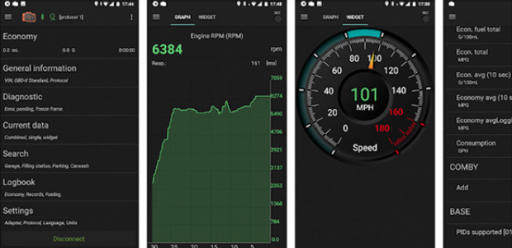
I have been on the hunt for an 'OBD2 Blu-Tooth Plug-n-play application' for my Android in order to keep tabs on my rigs data over a long trip. These suckers are neat and have been becoming popular amongst the overland community guys. I would say these blu-tooth obd2 plugs would be useful to observe the overall real time 'health' of everything inside the vehicles vital areas to ensure the trip wont be stopped short of something catastrophic. I think of these kind of like an insurance.

I have not used these before however I have seen others use them online and was wondering if any one here has used these? I could see these becoming useful before emission testing to if your state calls for those. I would like to hear your review or 2c on these things. If you have personal experience with these which one do you prefer?

- Nickzero
Screen Shot 2019-02-19 at 9.46.12 PM.png
 
I have been using "Torque Pro" for my F250 for about a year now and I love it. It allows me to keep tabs on some more specific information that will let me know if something is deteriorating before it becomes a problem. It also gives me some niceties like a GPS speedometer that keeps me legal. Re-calibrating my truck is not a trivial endeavor.

For $25 all in, it's a great cheap addition. Considering that most of my gauges get their information from the ECM, and this sources it's information from there as well, I think it's well worth it.

I've actually used it on many of my vehicles to check codes as well. That's another bonus to having it. I don't have to go to autozone or a mechanic to get some simple codes as part of troubleshooting.
 
I've been curious about them lately as well. I have looked at a couple online, Automatic 2 & OBD Fusion, but haven't made a purchase yet. Also, I have been looking at iOS capability, so these may not help you.

I look forward to hearing what others on this forum have used, as well their likes and dislikes.
 
  • Like
Reactions: Nickzero
Another Torque Pro user here. I couple it with an OBDLink LX Bluetooth dongle that has been permanently plugged into my Land Cruiser for 3 years.

I do not utilize much of the graphing power of Torque, but I do read several of the instantaneous gauges. By consistently reviewing various sensors, you can pick up on a problem or a sluggish sensor before the CEL illuminates. One miss fire I was tracking down turned out to be a brand new MAF sensor. When the miss would occur, I could see the MAF sensor reading 'max out' then return to normal when the miss stopped.

Having an Android based radio in the vehicle is also a luxury. Torque is available anytime, anywhere.

This is my usual 'health' screen:
img_20181227_110933-jpg.1863558

*note the low coolant temperature was from a motor than hadn't heated up yet.

Followed by the fuel trims screen. Short Term, Long Term and plain fuel trim, for both engine banks. I like to watch fuel trims because you can pinpoint lazy O2 sensors, which bank a failing coil is on and if the injectors are having issues. I isolated a miss to Bank1 by watching the instantaneous fuel trims. When the miss would occur the fuel trim would run rich, then return to normal when the miss stopped. In this case, I simply replaced all of the coils on Bank1. Coincidentally, Bank2 started causing problems a few weeks later and got new coils.

img_20181227_114111-jpg.1863570


I have been a Torque Pro user for almost 10 years now. I do have a few complaints.
- Setting up the gauges display is a pain.
- When torque opens, it opens to a menu. I'd rather it jump right to the gauge screen.

What I like about Torque Pro:
- Once set up, it just works
- Many addition add on options, such as dash cam video with gauge data displayed on the video
- Very easy to read, clear and research codes that do pop up. It also displays 'gray/ghost' codes if stored in the ECU.

imag1791-jpg.1483114
 
@KanzaLander Thank you for the detailed information. I think keeping an eye on fuel trims, oil temp / pressure and primary sensors are important. Also like how you can run your own diagnosis on your vehicle instead of buying one of those expensive code readers or taking a trip to AutoZone.

TQ Pro looks like its on the top of my list. Also thanks Jimmy P for your 2c, it gives me a much better idea of what I am getting into here. Thanks guys!
 
X3 on torque pro.
If your just reading codes and viewing data, most of the Bluetooth dongles work good enough.
If you want more accuracy you need a faster one.

I couple it with an OBDLink LX Bluetooth dongle that has been permanently plugged into my Land Cruiser for 3 years

This is the fastest one available. https://www.scantool.net/obdlink-mxp/
The refresh rate is almost as good as having it wired to the car. The cheaper ones refresh between 1 time a sec to 5 times a sec. A scan tool plugged in is around 200 times a sec. The OBDLink LX is around 150 times a sec. This is also one of the only ones that works properly with I-Phone. I have scan tools at work and keep this in my vehicle.

Scott
 
Another Torque Pro user here. I couple it with an OBDLink LX Bluetooth dongle that has been permanently plugged into my Land Cruiser for 3 years.

I do not utilize much of the graphing power of Torque, but I do read several of the instantaneous gauges. By consistently reviewing various sensors, you can pick up on a problem or a sluggish sensor before the CEL illuminates. One miss fire I was tracking down turned out to be a brand new MAF sensor. When the miss would occur, I could see the MAF sensor reading 'max out' then return to normal when the miss stopped.

Having an Android based radio in the vehicle is also a luxury. Torque is available anytime, anywhere.

This is my usual 'health' screen:
img_20181227_110933-jpg.1863558

*note the low coolant temperature was from a motor than hadn't heated up yet.

Followed by the fuel trims screen. Short Term, Long Term and plain fuel trim, for both engine banks. I like to watch fuel trims because you can pinpoint lazy O2 sensors, which bank a failing coil is on and if the injectors are having issues. I isolated a miss to Bank1 by watching the instantaneous fuel trims. When the miss would occur the fuel trim would run rich, then return to normal when the miss stopped. In this case, I simply replaced all of the coils on Bank1. Coincidentally, Bank2 started causing problems a few weeks later and got new coils.

img_20181227_114111-jpg.1863570


I have been a Torque Pro user for almost 10 years now. I do have a few complaints.
- Setting up the gauges display is a pain.
- When torque opens, it opens to a menu. I'd rather it jump right to the gauge screen.

What I like about Torque Pro:
- Once set up, it just works
- Many addition add on options, such as dash cam video with gauge data displayed on the video
- Very easy to read, clear and research codes that do pop up. It also displays 'gray/ghost' codes if stored in the ECU.

imag1791-jpg.1483114
What radio do you have ?
 
What radio do you have ?
It is an Atoto M4 running a 4.x version of Android. The radio is several years old and Atoto has much newer radios with more options available now. Picked mine up from Amazon Prime, so there was not much risk if it didn't work out of the box. The radio fits a standard 2DIN opening and has a AM/FM radio, decent audio output and a stellar price tag for what you get.
 
  • Like
Reactions: Jimmy P
I’ve always wondered about this stuff, like why people have I-pads and tablets hooked into their rigs. Why how. Stuff like that. Seems really cool. Will they work on a 96 tacoma? Or to simple tech?
 
  • Like
Reactions: Desert Runner
I’ve always wondered about this stuff, like why people have I-pads and tablets hooked into their rigs. Why how. Stuff like that. Seems really cool. Will they work on a 96 tacoma? Or to simple tech?
If your 1996 is OBDII it will work. I am not sure when the Tacoma switched over to OBDII, but most manufacturers did it in 96/97.