
Gaia on Apple CarPlay!

Big news! Gaia GPS’s most requested feature, CarPlay integration, is now live. You can get all of Gaia GPS’s outdoor map sources on your vehicle’s dashboard touchscreen. CarPlay offers handsfree navigation from city streets to remote dusty dirt roads far from cell service.

Apple CarPlay is available for iOS on iPhone 5s & newer. Learn more and try it today: https://blog.gaiagps.com/gaia-gps-integrates-apple-carplay/

Need help getting setup? Check out this article: Gaia GPS and Apple Carplay or email support@gaiagps.com.
 
  • Like
Reactions: great08
Biggest thing with this is,

"Due to the inherent risks of using a screen while operating a vehicle, only limited features from the Gaia GPS app are available while using CarPlay."

Most of us travel with a co pilot. They can operate the screen without any issues while moving. I will stick to my tablet based nav. We can do the things we need while in motion.
 
Biggest thing with this is,

"Due to the inherent risks of using a screen while operating a vehicle, only limited features from the Gaia GPS app are available while using CarPlay."

Most of us travel with a co pilot. They can operate the screen without any issues while moving. I will stick to my tablet based nav. We can do the things we need while in motion.


This limitation is something Apple requires vs Gaia not programming something. I have read the Apple Developer documentation on creating a CarPlay app and it is pretty limiting. I will be writing an article on CarPlay this week. It will probably go live next week. This will be a part of the article.

One great use I have found is run one map layer at 100% on my phone/CarPlay and another on my iPad. This gives me nice clear pictures of where we are travelling. At the moment I have been running Satellite imagery on CarPlay and a Topo layer along with a few others on my iPad.

I will say for those that don't want to invest in a tablet and mounting said tablet in their vehicle CarPlay is a nice addition.
 
This limitation is something Apple requires vs Gaia not programming something. I have read the Apple Developer documentation on creating a CarPlay app and it is pretty limiting. I will be writing an article on CarPlay this week. It will probably go live next week. This will be a part of the article.

One great use I have found is run one map layer at 100% on my phone/CarPlay and another on my iPad. This gives me nice clear pictures of where we are travelling. At the moment I have been running Satellite imagery on CarPlay and a Topo layer along with a few others on my iPad.

I will say for those that don't want to invest in a tablet and mounting said tablet in their vehicle CarPlay is a nice addition.

I haven't had a chance to experience much with it, but does the CarPlay not allow multiple layers showing on the CarPlay screen?
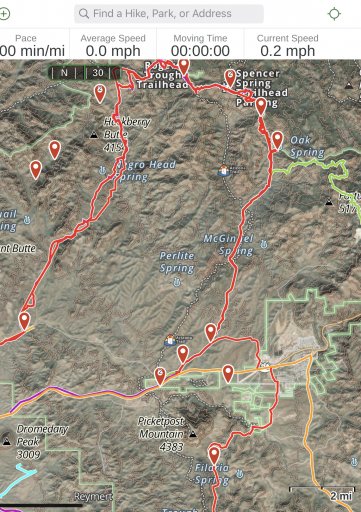
 
I haven't had a chance to experience much with it, but does the CarPlay not allow multiple layers showing on the CarPlay screen?

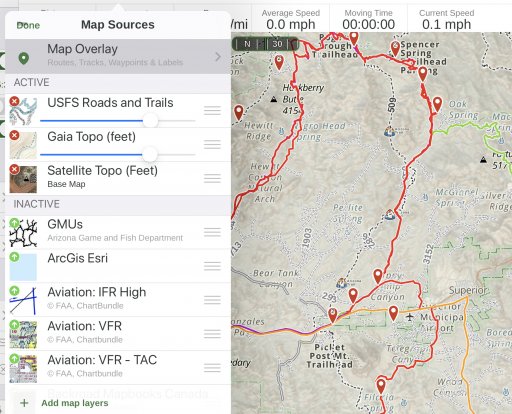
It mirrors what is on your phone. I find a 100% view of Satellite on one screen and topo on another more useful. Other layers work better together IMHO Like USFS 2016, USFS Roads and Trails, and the public or private land data layers.

I would rather have something like this on the CarPlay screen -
8645C1F0-F306-4E0C-9ACB-C1EE90A133EE.jpeg

VS This - I personally don’t find trying to blend satellite imagery with other layers useful.
BEE58EE7-DDCD-4136-964C-D64A665FACF2.jpeg

I don't have CarPlay in my living room :) so I can't provide a real example at the moment.
 
Last edited:
I am able to get it on CarPlay in my Jeep but it is dark green background with brown topo lines and very difficult to see while at the same time my phone is crystal clear brown topo lines on a light background. I have reinstalled the app and finally just gave up
 
I am able to get it on CarPlay in my Jeep but it is dark green background with brown topo lines and very difficult to see while at the same time my phone is crystal clear brown topo lines on a light background. I have reinstalled the app and finally just gave up

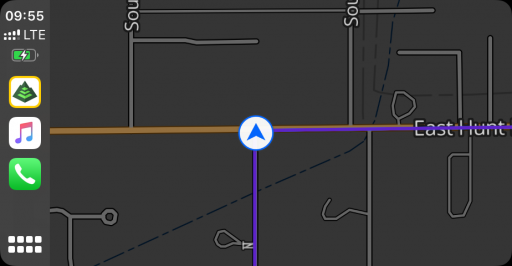
If you take a screenshot of your phone while connected to CarPlay it will also take a screenshot of the CarPlay screen. It sounds like the CarPlay screen is in dark mode. Does the same thing happen with Apple Maps or Google Maps?
 
I am able to get it on CarPlay in my Jeep but it is dark green background with brown topo lines and very difficult to see while at the same time my phone is crystal clear brown topo lines on a light background. I have reinstalled the app and finally just gave up

Hey Wanderer,

CarPlay has a separate dark mode setting.

If your CarPlay screen is displaying in dark mode even though your iPhone has dark mode disabled, you can follow these steps to change the setting:

  • Connect your iPhone to your vehicle’s CarPlay system
  • Open the Settings app in CarPlay
  • Tap Appearance
  • Change the setting from Always Dark to Automatic
 
  • Like
Reactions: great08
Hey Wanderer,

CarPlay has a separate dark mode setting.

If your CarPlay screen is displaying in dark mode even though your iPhone has dark mode disabled, you can follow these steps to change the setting:

  • Connect your iPhone to your vehicle’s CarPlay system
  • Open the Settings app in CarPlay
  • Tap Appearance
  • Change the setting from Always Dark to Automatic
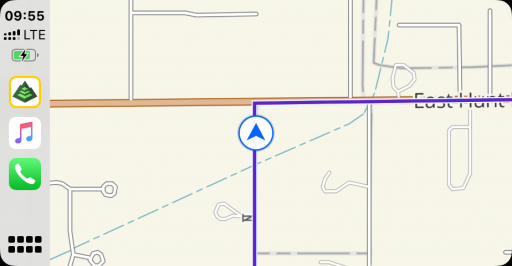
I believe Gaia Topo is the only layer that supports dark mode. If you switch to a different layer let us know if you are still having screen issues.

F0CCD034-5B5D-488C-AB29-52ACB18A7D83.png
Dark Mode

03E2EEB9-69D4-4BDB-AE47-174FB0515A7E.png
Normal

Many radios default to dark mode always for some reason. Mine did.
 
Last edited:
  • Like
Reactions: great08