Downloading Offline Maps?

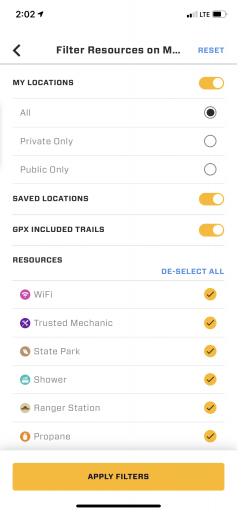
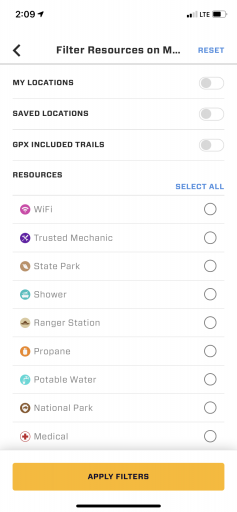
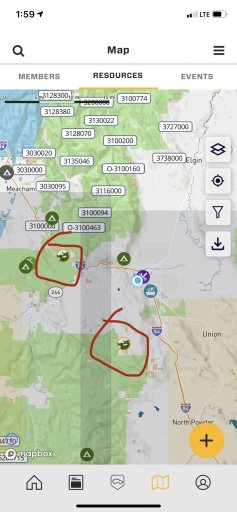
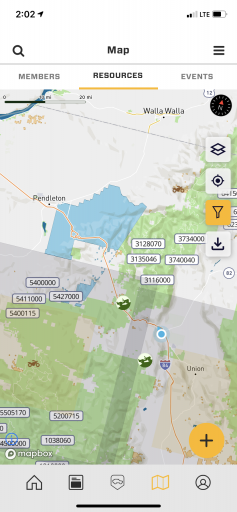
Hey I found a bug… when I open the map on OB1 build 10.6.1.2021073102 and deselect all filters and click apply and then reselect filters and click apply, the icons don’t reappear on the map.
7ECD2198-80E0-4B55-BD70-FEB1EB0DE5BF.jpegA2E5A27B-B2E9-4B11-8367-5855C745E796.png94A6750A-EB1D-425E-B868-7CFEBEEF42D3.png98690E6C-C2C0-4EA9-B6DB-AD4AF06D9026.png
 
This also happens to me sometimes. But I can't reproduce it systematically. I try then a little back and forth, so select, de-select... and suddenly the icons are there again.
 
  • Like
Reactions: Michael
I had the same question. When I click on OFFLINE Maps it says "You are a member of this feature..." along those lines and at the bottom is says "Continue" with a message "You purchased your membership online. If you continue it will not be cancelled" or something like that. I can't tell if I have it or not (I understand it isn't live yet, still confused if I will hve it). Sorry, I am on day 2 of my membership and trying to figure things out.

Also wonderig, how come the resource map online has a filter for "Offroad Trail", but the APP version does not?
Hi Steve - the app has a seperate "Trail" tab (you will see that above the map). To view offroad trails, go to that tab. you can then filter for specific trail features. Now - just when you get used to that, we are changing it in the next release to consolidate "Resources" and "Trails" into one tab.
 
Hey I found a bug… when I open the map on OB1 build 10.6.1.2021073102 and deselect all filters and click apply and then reselect filters and click apply, the icons don’t reappear on the map.
View attachment 208222View attachment 208223View attachment 208224View attachment 208225
The way the beta app plays with the production app is going to be rough. I think we can attribute it to the new map features, and how they play with the production environment. If you went into dev mode (by tapping the big logo on the login screen 3X) i bet it would work OK. It should.
 
  • Like
Reactions: M Rose
The way the beta app plays with the production app is going to be rough. I think we can attribute it to the new map features, and how they play with the production environment. If you went into dev mode (by tapping the big logo on the login screen 3X) i bet it would work OK. It should.
I can’t get Dev Mode to work at all.