Ask About Gaia GPS!

Not sure why everyone keeps saying that about the cell equipped ipads... it’s only assisted gps, and as soon as you get off grid, out of cell tower range, it doesn’t work at all.

You need a true bluetooth gps to function well on and off the cell grid. I suppose if you are using Gaia in a metropolis, then you may be ok, but who in the world wants to do that? I prefer to GET AWAY when overlanding...

James

I have only owned 1 with 3G service. It worked where and when I wanted to use it but that was a long time ago. I have heard others using it in the wild and it still tracking but as I said if you want better coverage and reliability get a Bluetooth GPS unit to pair with your tablet.

Thanks for the feedback.
 
Not sure why everyone keeps saying that about the cell equipped ipads... it’s only assisted gps, and as soon as you get off grid, out of cell tower range, it doesn’t work at all.

You need a true bluetooth gps to function well on and off the cell grid. I suppose if you are using Gaia in a metropolis, then you may be ok, but who in the world wants to do that? I prefer to GET AWAY when overlanding...

James

Incorrect. It’s a fully functioning GPS receiver, the “assist” function means that it will use any nearby cell towers to get your location faster on start up instead of waiting for the GPS receiver to lock onto the satellites. You do not need an external receiver if you have a cellular equipt iPad.
 
  • Like
Reactions: Road
Not sure why everyone keeps saying that about the cell equipped ipads... it’s only assisted gps, and as soon as you get off grid, out of cell tower range, it doesn’t work at all.

You need a true bluetooth gps to function well on and off the cell grid. I suppose if you are using Gaia in a metropolis, then you may be ok, but who in the world wants to do that? I prefer to GET AWAY when overlanding...

James
Not sure Im reading this right but, I use a mobile/cellular ready iPad with Gaia Pro and do not have service for it and the cell feature is turned off. The GPS function works great everywhere including the middle of nowhere. I check the Coordinates to my hand held and its spot on.
 
  • Like
Reactions: 1Louder and Road
That’s interesting, and goes against everything i’ve read... but if you’ve tried it, i stand corrected... i’d like to see some literature saying that an ipad can connect to satellites though...

Jamed
 
That’s interesting, and goes against everything i’ve read... but if you’ve tried it, i stand corrected... i’d like to see some literature saying that an ipad can connect to satellites though...

Jamed
Yep use it all the time, it was originally an AT&T iPad that never had the service started. I found out about this from some of our club members that were doing the same thing.
 
Is there a reason the gos on my iphone won’t work when off the grid?

James
I dont know about that, I have used my iPhone with Gaia without cell service. Last year I recorded the Mojave Road with it along with my iPad just to make sure they were the same.
 
I dont know about that, I have used my iPhone with Gaia without cell service. Last year I recorded the Mojave Road with it along with my iPad just to make sure they were the same.
This is my set up.

IMG_3283.JPG
 
Is there a reason the gos on my iphone won’t work when off the grid?

James

Sorry if I missed context in an earlier post but do you have the background maps downloaded to your device. Off grid, your GPS should work but if you don't have a map pre-loaded, you might just see the pointer and no detail.

A handy app to check if your device is actually picking up the GPS sats. Worth the $3 to me for the diagnostics: https://itunes.apple.com/us/app/gps-diagnostic-satellite-test/id1020967894?mt=8
 
  • Like
Reactions: Road
That’s interesting, and goes against everything i’ve read... but if you’ve tried it, i stand corrected... i’d like to see some literature saying that an ipad can connect to satellites though...

Jamed
You may need to download the maps or make them available offline. Most of the map apps require internet unless you do so.
 
Sorry if I missed context in an earlier post but do you have the background maps downloaded to your device. Off grid, your GPS should work but if you don't have a map pre-loaded, you might just see the pointer and no detail.

A handy app to check if your device is actually picking up the GPS sats. Worth the $3 to me for the diagnostics: https://itunes.apple.com/us/app/gps-diagnostic-satellite-test/id1020967894?mt=8

That's a handy little app. Downloaded it yesterday (which then shows up on all my other devices) and like what it does so far.
 
That’s interesting, and goes against everything i’ve read... but if you’ve tried it, i stand corrected... i’d like to see some literature saying that an ipad can connect to satellites though...

Jamed

Here you go:
 
Hi!

First off, thank you for answering 20 pages worth of questions.

Gaia has differently been a learning curve for me. I have a few questions of my own.

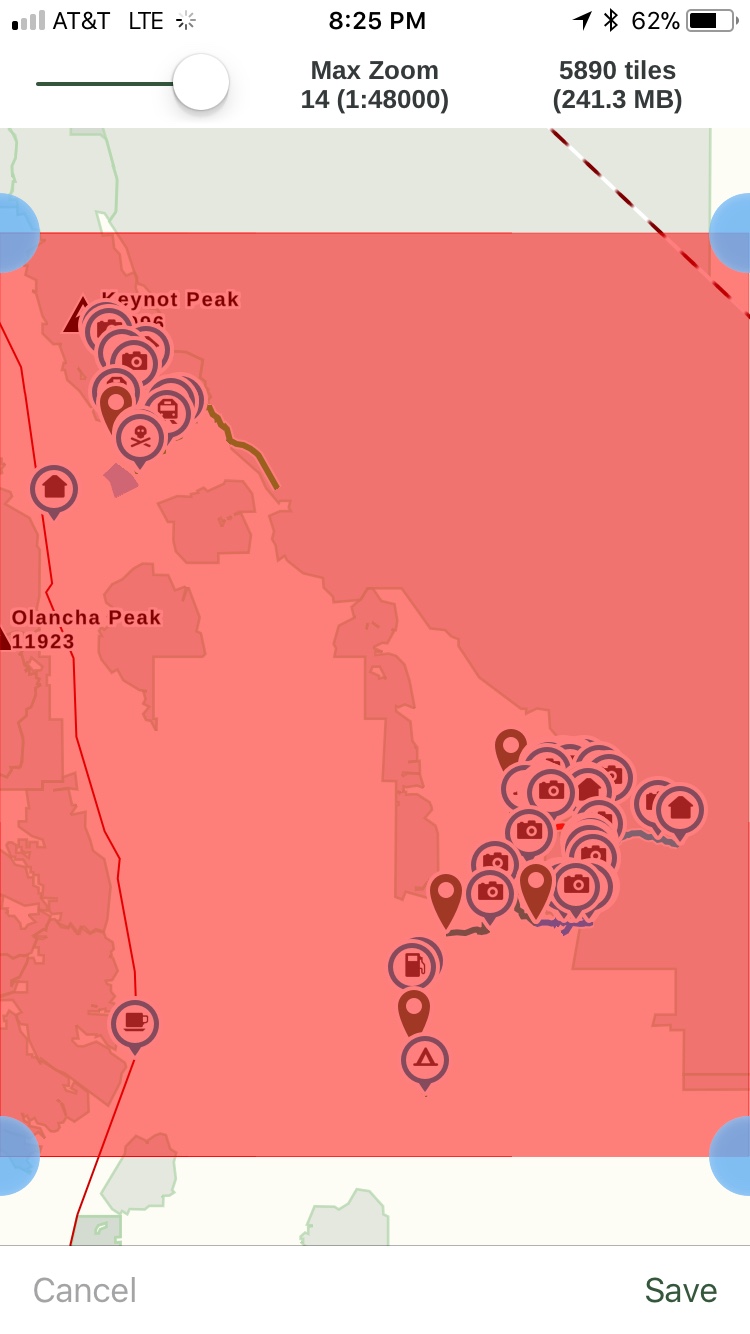
1. When downloading the map for an area, do I need to be on the layer that id like for it to download? For example, I’d like to download the Gaia Topo and the USFS 2016. I have inputted my waypoints and created the tracks as seen in the picture.

2. Once I reach the trailhead, do I need to do anything on the app? Or do I just make sure the smart arrow stays on the track? What I mean by this is, do I hit the guide me option or do I just follow along making sure I stay on the track that I have previously made?

Thanks in advance.
2df8678b55839dc8bf05861d6fcfbd01.jpg


Sent from my iPhone using OB Talk
 
Hi!

First off, thank you for answering 20 pages worth of questions.

1. When downloading the map for an area, do I need to be on the layer that id like for it to download? For example, I’d like to download the Gaia Topo and the USFS 2016. I have inputted my waypoints and created the tracks as seen in the picture.

You need to select the map layers you want to save and then save them. Another option if you have a track is you can download along a track. Many times this is good enough and a faster method for longer routes. Especially if you don't plan to deviate. Yes plans can change but you might download a very detailed map along the route/track and less detailed for a large area that still gives you some detail.

Hi!

2. Once I reach the trailhead, do I need to do anything on the app? Or do I just make sure the smart arrow stays on the track? What I mean by this is, do I hit the guide me option or do I just follow along making sure I stay on the track that I have previously made?

There is no turn by turn in Gaia GPS. Guide me only provides a straight line to the next waypoint. So yes all you really do is follow your own line. You can always place waypoints for critical turns.
 
You need to select the map layers you want to save and then save them. Another option if you have a track is you can download along a track. Many times this is good enough and a faster method for longer routes. Especially if you don't plan to deviate. Yes plans can change but you might download a very detailed map along the route/track and less detailed for a large area that still gives you some detail.


There is no turn by turn in Gaia GPS. Guide me only provides a straight line to the next waypoint. So yes all you really do is follow your own line. You can always place waypoints for critical turns.

Thank you for your answer!

So, the guide me feature is useless for waypoints in the desert? This would seem obvious as I can’t image there are turn by turn directions.

Would you say the Guide Me feature is mainly for city driving?

Also, with my iPhone in airplane mode, I just need to keep the smart arrow on the track I created. Nothing else needs to be done by me other than navigate by staying on the track?

Sorry, I’m new to this and want to make sure I fully understand this app before going on our trip.

Lastly, I’m currently running Gaia from my iPhone but I’m considering buying an iPad Mini 4 WiFi with Garmin GLO. Would this set up work correctly if I’m running Gaia from the iPad?

Sent from my iPhone using OB Talk
 
Last edited:
Thank you for your answer!

So, the guide me feature is useless for waypoints in the desert? This would seem obvious as I can’t image there are turn by turn directions.

Would you say the Guide Me feature is mainly for city driving?

Also, with my iPhone in airplane mode, I just need to keep the smart arrow on the track I created. Nothing else needs to be done by me other than navigate by staying on the track?

Sorry, I’m new to this and want to make sure I fully understand this app before going on our trip.

Lastly, I’m currently running Gaia from my iPhone but I’m considering buying an iPad Mini 4 WiFi with Garmin GLO. Would this set up work correctly if I’m running Gaia from the iPad?

Sent from my iPhone using OB Talk

It is easy to keep on the track with the arrow, just takes practice. Zoom in to what you feel comfortable and it becomes easy. I have been using a Garmin 60 and Montana in the desert for years and it has been second nature to me for a long time. I was coming off a Motorcycle so couldn't hear turn by turn anyhow had to follow the line. Your phone or tablet need access to cell towers to maintain the arrow's location. I use a Dual SkyPro GPS Receiver (XGPS160) with bluetooth to my iPad for satellite location. Has worked great. I use my phone as a hot spot when I have signal for maps to be updated in real time.
I use the USFS 2016 for off-road most of the time. But I check other maps to see if my track is better represented with any of the others. Coming from a Garmin system to the Gaia has been a learning curve but i'm enjoying it. I still use Garmin BaseCamp to layout my waypoints, routes and tracks but keep trying with the Gaia and am learning. You can also use google earth to make tracks and install them in Gaia for use that way also. See a video tutorial Michael did on this on the YouTube channel.
 
  • Like
Reactions: 1Louder