Resolved OB one app

Status
Not open for further replies.

T. Stanley

Rocky Mountain Region Member Rep Kansas
Launch Member

Member III

2,551
Clay Center, Kansas
First Name
Tim
Last Name
Stanley
Member #

25893

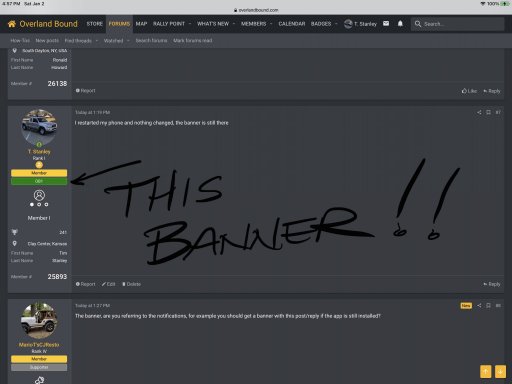
How do I get rid of the OB1 banner on my profile? I deleted the app from my phone as I mostly use a windows based computer and safari on my phone, the app constantly wanted to hijack my ability to use safari and force me to utilize the app and that was frustrating to me so I deleted the app, now I want to get rid of the banner.
 
How do I get rid of the OB1 banner on my profile? I deleted the app from my phone as I mostly use a windows based computer and safari on my phone, the app constantly wanted to hijack my ability to use safari and force me to utilize the app and that was frustrating to me so I deleted the app, now I want to get rid of the banner.

Did you simple delete the app or uninstall it??? By uninstalling it, it should remove the banner also.
 
  • Like
Reactions: MarioT'sCJResto
On my phone it asked if I wanted to remove all data with removing the app and I said yes, that was all the options I had.
 
Never heard of such a procedure on an iPhone, normally the procedure is: hold your finger on the app until it “wiggles” then you get the options to remove app, share app or edit home screen. I selected remove app and then the option to remove data along with removing the app, I just restarted my phone, I will see if that changes anything
 
Never heard of such a procedure on an iPhone, normally the procedure is: hold your finger on the app until it “wiggles” then you get the options to remove app, share app or edit home screen. I selected remove app and then the option to remove data along with removing the app, I just restarted my phone, I will see if that changes anything
iPhone.....I will have to ask my kids about that one...lol. I prefer Android.
 
The banner, are you referring to the notifications, for example you should get a banner with this post/reply if the app is still installed?
 
Settings>(scroll all the way down until you find the)Overland Bound App>Notifications (Banners, Sounds, Badges) should give you the options that you’re looking for.

Source- IPhone11
 
I experienced something similar and I just deleted the app, not from the desktop view but the entire app. Then I installed it back and everything was back to normal.

My guess here is that it’s just a glitch that was fixed, these happen all the time with some of the most popular apps on the market. As the app grows, subs increase the kinks will be worked out.
 
@Jim SoG can you tell me who I need to speak to to get the OB1 app banner removed from my profile? If you look at one of my earlier posts in this thread you can see the one I am referring to.
 
@Jim SoG can you tell me who I need to speak to to get the OB1 app banner removed from my profile? If you look at one of my earlier posts in this thread you can see the one I am referring to.
Umm let me see if it is possible, I think it comes from you used the app..... Hang on
 
Status
Not open for further replies.