Alpha 0.8.48 Build Patch Notes

Status
Not open for further replies.
iOS. I cannot scroll to the top of any thread. This thread or any others. If I scroll fast it just ends up right at the bottom after looking like it’s scrolling. If I scroll slowly it goes about 12 posts then rubber bands back to the bottom.


Ps....We keep seeing notes about the map... you guys keep teasing us!

Same for me on Android 9, Samsung A20.

I tried a few times to scroll up very very slowly and every single time, I can go all the way up to see post #4 completely but when I gest to post #3, I can only scroll up to to see Michael's reply below the quote. As soon as the quote begins to show on the screen it jumps right down to the end of the thread again.

Edit: And now that I created this new post, is does it on post #4 instead of #3. I am guessing that after the next post it will start doing it at post #5.
 
Morning folks,
I'm having the same crash problem in iOS but I think it is because I'm running sub iOS 10. I'm on 9.3.5, as I have an older iPad mini 2. I noticed that the minimum is iOS 10 on your top post " Bumped iOS minimum supported OS version to 10.0" so I'm guessing ??
As Upperleft Expeditions mentioned I've tried all your suggestion and it still just crashes after to splash screen, it has been doing this for the last 3 updates I think, including this one.

Thanks
 
Android 10, Note 10+

Noticed when browsing the forums that the subforums (like under Overland Bound by Region) are listed in line with the master forum. And for OB by Region which has subforums under its subforums all of them are listed on the same page which makes for a very messy view of the forums.

Also when trying to get to the first message in a post it keeps jumping back to the newest post, both when tapping the |< and scrolling manually.
 
Welcome to the Overland Bound, OB1 Alpha Test Program.

Please keep in mind this is Alpha Software. This means it is incomplete, and may be broken in some cases. This is expected. There some "Known Issues". If you leave a post and it does not get a response it probably means the post goes into the Known Issue category. I’ll usually “like” the post to show we’ve seen it.

Please provide any specific information about issues you find in this thread.

Known Issue: No work has been done for tablets or landscape mode. It may work, but that's only by chance :)

When reporting bugs:

Provide platform: iOS or Android
Provide Device Info: What are you using?
Reproduction steps: Let us know how to reproduce the issue.

Ideas: We want to know what is frustrating, unclear, or could be improved. Most importantly, what would make you use this app as your preferred forum, map, event app.

Known: No work has been done for tablets or landscape mode. It may work, but that's only by chance :)

APPLE BUILD: Alpha 0.8.48 Build Patch has been released and is in review by Apple. You should receive an email once approved by Apple if you are in the test group. To join this test group, fill out this form: Expedition Pioneers. Once installed, your build should show: 0.8.48 (at the bottom of the slide-out menu within the app)

ANDROID BUILD: May be downloaded here (option to install APKs must be enabled): OB1_Build_0.8.48.apk

Testing Focus:

Forum usage
Message usage
Notifications
Status Updates
Feed Interrupts including "All Caught Up", "Latest Member" and "Status Updates"

New Features:

- New Message Indicators (slide-out menu)
- New Notification indicator (slide out menu)
- Any new item indicator (hamburger menu)
- Special "Pinned Post" formatting.
- Latest Status Updates (slide out menu)

Bugs Fixed:

- "Watched Threads" pill should now updated correctly, fixing feed view.
- All images should properly load.
- Notification links go to post
- Fixed how the forum feed vs forum list URLs were calculated.
- Split the forum feed and forum list filter state into different Redux store maps.
- Refactored sagas to read the filter state from the correct place and for fetch and fetch more threads.
- Fixed a typo on the "all" thread filter badges.
- Fixed the forum thread list to summarize pinned threads (no HTML summary).

Additional work, features, fixes

Upgraded the app to RN0.62.0-rc3
• Added flow-typed to the project to add a ton of missing coverage and ensure proper use of dependencies
• Switched the .eslintrc.js file from a .js file back to just .eslintrc
• Updated the flowconfig file
• Bumped iOS minimum supported OS version to 10.0
• Resolved a number of Flow errors from improper props/use/declarations
• Resolved pinch to zoom issue on ImageViewer for Android
• Ripped out more instances of NativeBase across the app
• Added a new reducer for mapPreferences
• Added new map image assets
• Added new map resources image assets
• Added the map visibility modal where overlays and map type can be changed
• Added more data sources and map style layers to the MapView
• Removed the FcIcon and TopBadge components
• Removed the screens and components that were in the src/screens directory. Many were clearly placeholder and none were being used
• Added MapRallyPointFilter and MapResourceFilter screens and renamed MapFilter to MapMemberFilter for consistency
• Fixed Profile Post List card spacing
• Created new reducer: createRallyPoint to handle data from the large rally point creation form
• Refactored TagAutoload and the Invites card
• Swapped out local component state with redux state for Rally Point creation components
• Created a new component TagCustom to remove dependency on react-native-tags and react-native-tag-input
• Componentized the add button UI on RallyPoint create: ButtonAddNew
• Move Channels and the index file into a combined file CardRallyPointChannels and rewrote it
• Refactored the Dropdown component and got it working smoothly as a functional component
• Code cleanup and refactoring
• Resynced flow-typed
• Fixed some Flow erros in our code
• Refactored and fixed up the Details component for Rally Point create
• Updated project dependencies
• Wait until the map style is done loading before rendering all of the source data and style layers


For iOS Testers:

Testers can now send feedback directly from your beta app simply by taking a screenshot and share detailed feedback with a crash report immediately after a crash occurs. TestFlight 2.3 and iOS 13 or later are required. You can view and manage tester feedback in App Store Connect.

From your app's TestFlight page, click Crashes or Screenshots in the Feedback section in the left side navigation. You can filter your feedback view by build numbers, app versions, devices, iOS versions, or tester groups.


Good afternoon Michael, @Firemom and I both signed up to be part of the testing for the new system but haven't heard anything or received any e-mails about it. Is there something else we need to do?

Thanks
 
  • Like
Reactions: Michael
Good afternoon Michael, @Firemom and I both signed up to be part of the testing for the new system but haven't heard anything or received any e-mails about it. Is there something else we need to do?

Thanks
Go to the first post in this thread and fallow the instructions.
 
  • Like
Reactions: Michael
Navigating long thread with onscreen buttons changes screen orientation.
iPad Pro 11, latest iOS.
Open the app in landscape mode, go to forums, find a long thread and open it up. Using thread nav buttons on bottom of page go to beginning of thread or previous page of thread. App switches to portrait mode and has to be shutdown/restarted to get back into Landscape. Thanks!
 
Navigating long thread with onscreen buttons changes screen orientation.
iPad Pro 11, latest iOS.
Open the app in landscape mode, go to forums, find a long thread and open it up. Using thread nav buttons on bottom of page go to beginning of thread or previous page of thread. App switches to portrait mode and has to be shutdown/restarted to get back into Landscape. Thanks!
Trying reply to thread post from app. First time send button was missing and cancel button was extra wide. BTW this thread is long enough to repro screen orientation issue.
 
Navigating long thread with onscreen buttons changes screen orientation.
iPad Pro 11, latest iOS.
Open the app in landscape mode, go to forums, find a long thread and open it up. Using thread nav buttons on bottom of page go to beginning of thread or previous page of thread. App switches to portrait mode and has to be shutdown/restarted to get back into Landscape. Thanks!
Trying reply to thread post from app. First time send button was missing and cancel button was extra wide. BTW this thread is long enough to repro screen orientation issue.

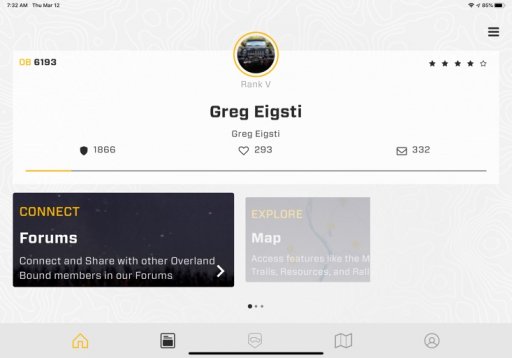
Nit. In the attached pic the area to the right of the Explore/Map tile should be filled with the tile and should react to finger swipes.
 

Attachments

  • media.jpg
    media.jpg
    52.9 KB · Views: 17
Navigating long thread with onscreen buttons changes screen orientation.
iPad Pro 11, latest iOS.
Open the app in landscape mode, go to forums, find a long thread and open it up. Using thread nav buttons on bottom of page go to beginning of thread or previous page of thread. App switches to portrait mode and has to be shutdown/restarted to get back into Landscape. Thanks!
Trying reply to thread post from app. First time send button was missing and cancel button was extra wide. BTW this thread is long enough to repro screen orientation issue.

Nit. In the attached pic the area to the right of the Explore/Map tile should be filled with the tile and should react to finger swipes.
Replying from the app in lansdscape will switch it to portrait.
 
Since installing and signing in with the app my ability to view alerts on the web site is broken. Clicking the bell (alerts) and then “show all” goes to a page that says there was a problem and contact support, etc. Cannot say the two are related but thought I’d throw it out there.

link to broken alerts page
 
Status
Not open for further replies.