DIY electrical drawings

Was reading this and found https://qelectrotech.org/download.html.
Mac, Win, Linux.
Going to play with it a bit and see how it works.

Scott

Spent a few min's playing with it. It is a bit much. Sketch up is easier. Will revisit it later.
Id been looking for a basic schematic drawing program, Microsoft use to have something very simple. Too bad it was wim 98.

Scott
 
  • Like
Reactions: nickburt
Spent a few min's playing with it. It is a bit much. Sketch up is easier. Will revisit it later.
Id been looking for a basic schematic drawing program, Microsoft use to have something very simple. Too bad it was wim 98.

Scott
Agreed - too much for our needs and not very quick to use, scales of components are all over the place.
 
You guys are making me want to diagram my setup now too. I may just take a first pass in something simple like a google drawing document.
 
  • Like
Reactions: Road
@nickburt @smritte @Mike W

This might be helpful, if you haven't seen it yet: Why is it so hard to draw a simple electrical symbol in layout

About the fifth post down is a link to electrical symbolsrev.skp - which is a simple collection of 2d drawings someone made of typical household electrical components. I downloaded and opened it into Sketchup Make, the free lighter-weight version of Sketchup Pro. Further down on that page is another collection that opens in layout, but again of typical household electrical like duplex outlets, dimmer switches, lights, etc.

I suspect somewhere there is a similar collection that someone has made for basic electrical symbols used in schematics, like some of these , but that can be used in Sketchup Layout or Sketchup Make so you can copy/paste and then be able to move, rotate into place, etc.

I'll keep poking around as I have time.
 
  • Like
Reactions: nickburt
@nickburt @smritte @Mike W

This might be helpful, if you haven't seen it yet: Why is it so hard to draw a simple electrical symbol in layout

About the fifth post down is a link to electrical symbolsrev.skp - which is a simple collection of 2d drawings someone made of typical household electrical components. I downloaded and opened it into Sketchup Make, the free lighter-weight version of Sketchup Pro. Further down on that page is another collection that opens in layout, but again of typical household electrical like duplex outlets, dimmer switches, lights, etc.

I suspect somewhere there is a similar collection that someone has made for basic electrical symbols used in schematics, like some of these , but that can be used in Sketchup Layout or Sketchup Make so you can copy/paste and then be able to move, rotate into place, etc.

I'll keep poking around as I have time.

Hmmm, having a play. Thanks @Road
 
  • Like
Reactions: Road
Sketchup, for those who have not played with it yet, is fairly straightforward to use in creating 3D models that you can rotate, see through, just all sorts of things. A mite confusing and potentially frustrating at first, but once you get the hang of it, it really is amazing what you can do. There are a ton of youtube vids on how to do various things. Sketchup has starting templates for woodworkers, architecture, and a mess more, preset to a typical scale for various trades.

So, in theory, it should be even more simple to create a 2D diagram in either Sketchup or Layout with electrical symbols we create ourselves, though I haven't tried it myself yet.

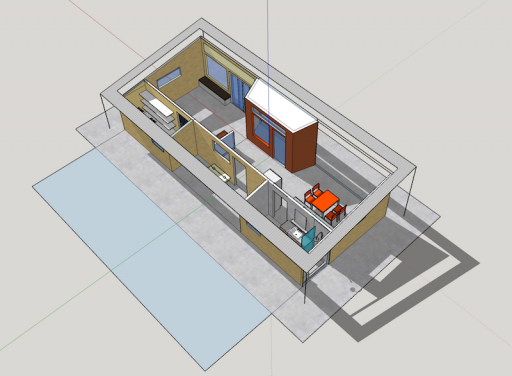
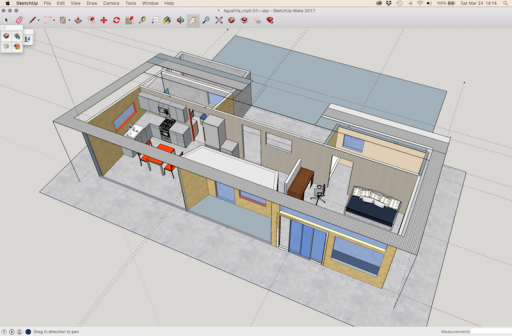
Just to show off, here are some screen captures of the type of 3D design you can do; a simple desert house I designed in Sketchup Make:

AquaFria-sim-01.png
You can even set shadows for geo coordinates and compass direction so you can see what your design will create for shadows inside and out as the earth turns.

AquaFria-add-02.png
Can't do it with these screen caps, but in Sketchup it is SO cool to be able to rotate your design and pass through walls, and see it from below or straight overhead. Really helps you see design strengths and weaknesses.

/showoff

So there must be an easy way to create 2D schematics with symbols someone, or one of us, has created.
 
  • Like
Reactions: nickburt and Tim
I used to use Microsoft Visio for electrical diagrams... worked well but not free. SketchUp looks interesting. Thanks for sharing.


Sent from my iPhone using OB Talk
 
  • Like
Reactions: Road