Desktop:
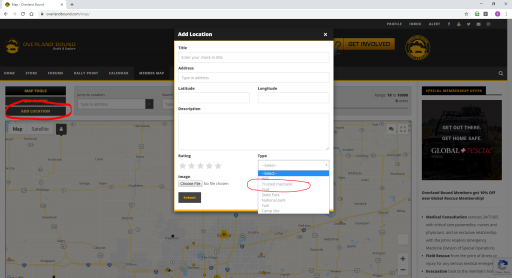
When looking at the map on the left there are 3 bars, Map Tools, Map Filters, and Add Location.
Click Add Location, a popup window will appear requesting info (name, address, lat/lon, description, etc).
On the bottom right of the box is a drop down menu for Type: with options such as WiFi, Trusted Mechanic, trail, state park, etc.
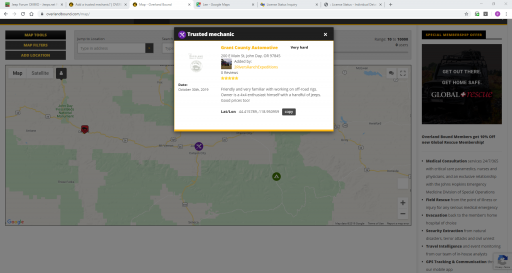
I tried to add a trusted mechanic (the first one in the entire state of Oregon!) about an hour ago, filled out everything, but its not on the map yet! I'm not sure if it takes a while or if its immediate. I created a Rally Point today too and that showed up on the map instantly though...
Hi Guest, Become a Member to gain access to the Member Forums, Member Map, Member Calendar of Events, and Rally Point overland trip planner! Click this link Learn More for more information!
This site uses cookies to help personalise content, tailor your experience and to keep you logged in if you register.
By continuing to use this site, you are consenting to our use of cookies.