Offline maps for tablet or smartphone....what app do you use?

e6157a36cd7b63a51e13a59914596cff.jpg


144fbcd2f476e504a7659df4f7888952.jpg


e1862254f01c3c521cd80de3c627707b.jpg


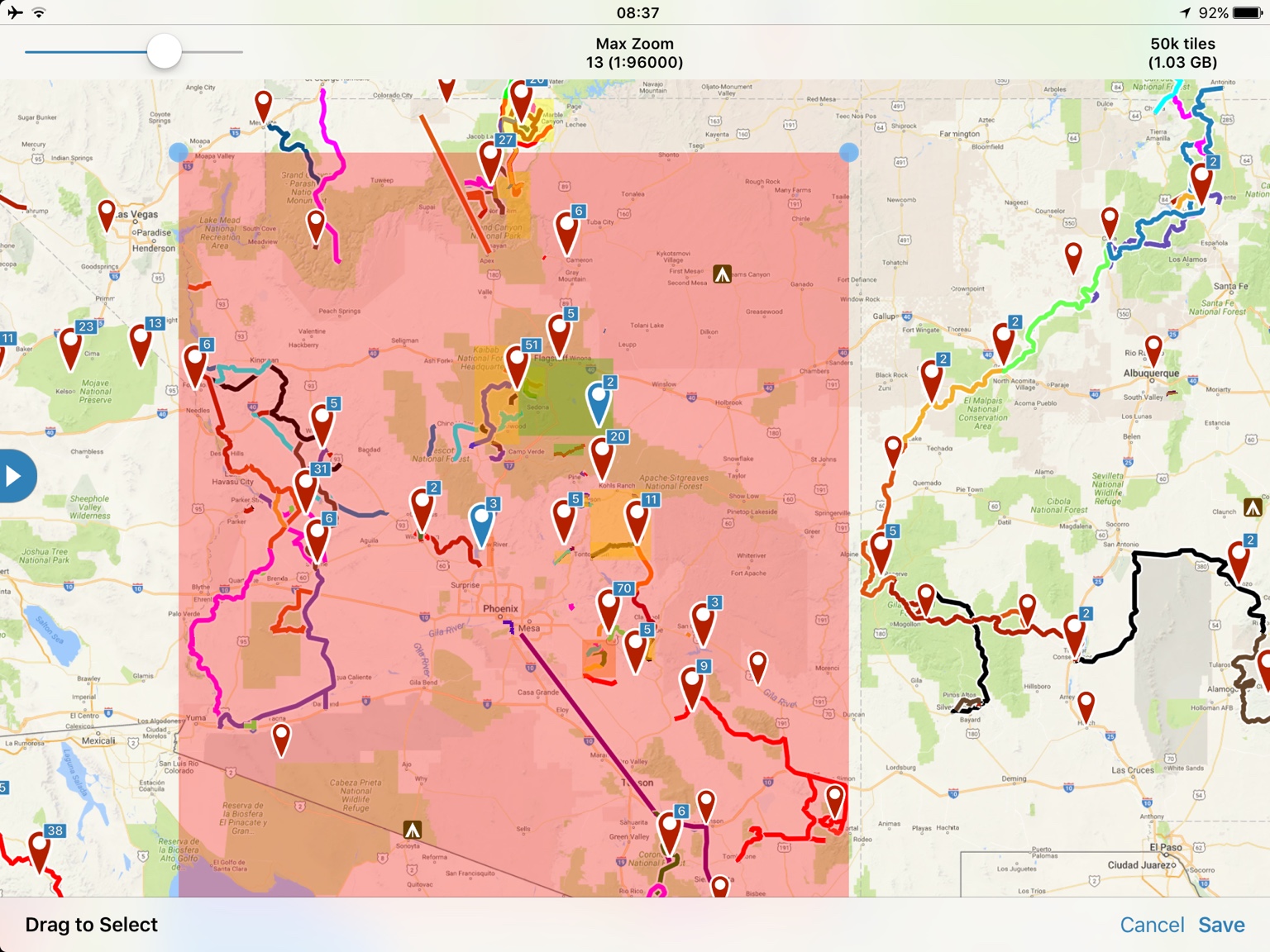
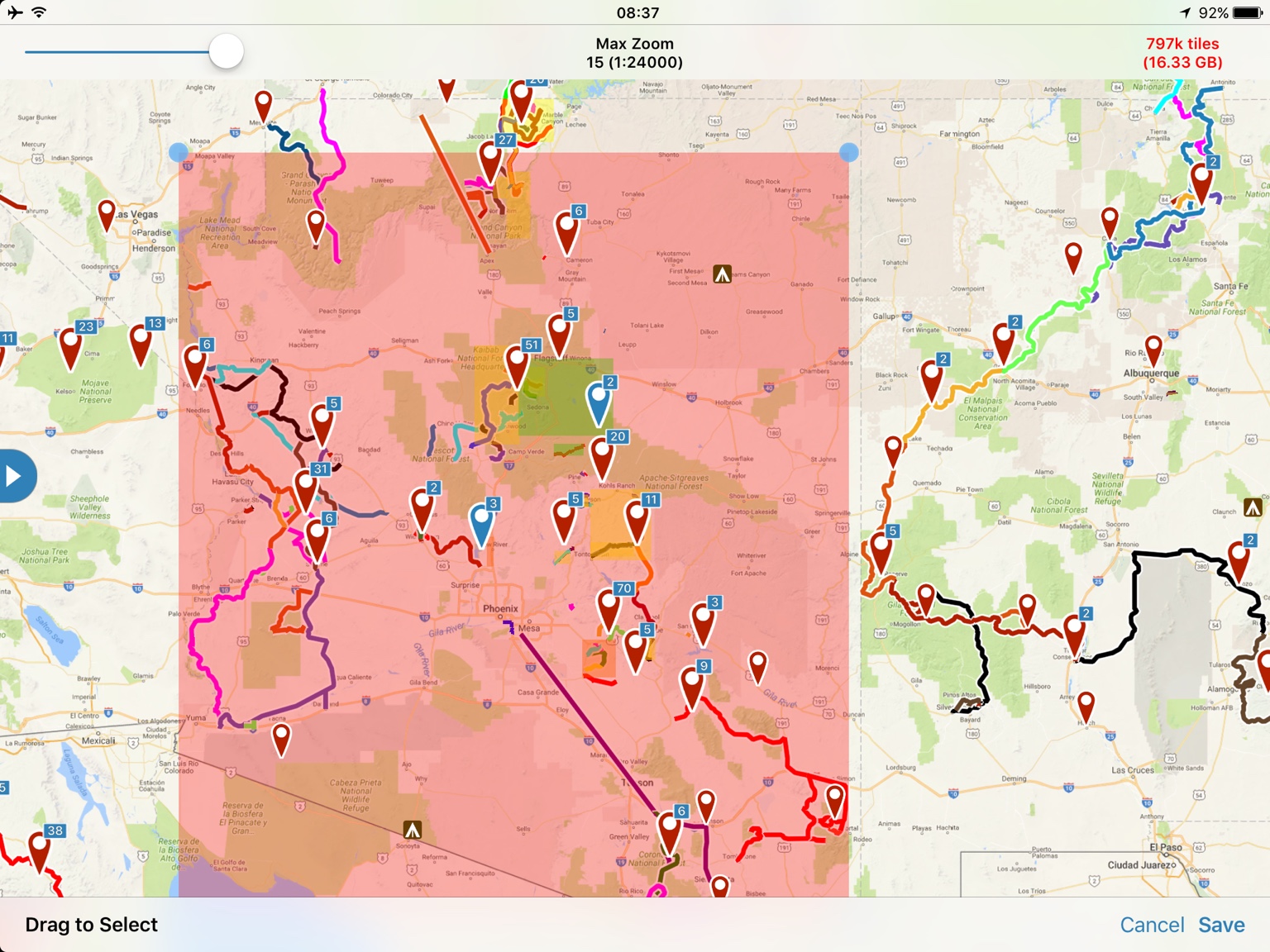
Here are a few examples of trying to download all of AZ. Will depend greatly on the map types you download and zoom level. Zoom level of 13 is about a gig, 14 is about a 4 gigs, and 15 around 16 gigs.
 
And that eight there is what I'm talking about. Why can't we just pick a huge section and download it all? I don't care how much space it takes.

I have never received an answer form inreach into why a person can download the basemap for a state but not the other details. My guess is bandwidth. I know its a pain sometimes, but I ended up downloading in batches until I had the entire state coverage.
 
Gaia downloads are way easier than Earthmate for anything other than the base map. You just have to have the storage space.
 
And that right there is what I'm talking about. Why can't we just pick a huge section and download it all? I don't care how much space it takes.
I currently use LeadNav. This question has been asked on their forum and it is due to limitations set by the company providing the satellite imagery. The company has a monopoly on the imagery and charges a pretty penny to download the images for offline use and the application companies are on the hook for those fees so that is why there is a subscription and limited to how much you can download at a time, otherwise the prices for these apps would sky rocket.
 
So Update, I just looked and Gaia has used 3.15GB of space. I think I have about 15 maps downloaded and several tracks saved. Hope this helps.

That does help. I'm currently trying to download my State (Iowa) and just the area around Des Moines and south to the Missouri state line is still downloading since yesterday. I was on wifi all night so I'd have thought they would have downloaded by now.

Is it better to download the maps on a desktop and then sync to the device? Does anyone else have trouble with downloads taking this long?
 
That does help. I'm currently trying to download my State (Iowa) and just the area around Des Moines and south to the Missouri state line is still downloading since yesterday. I was on wifi all night so I'd have thought they would have downloaded by now.

Is it better to download the maps on a desktop and then sync to the device? Does anyone else have trouble with downloads taking this long?


I don't think doing it online first helps. I would get on the Gaia GPS Reddit forum or email support for a better answer. They are very responsive.

What map layer(s) were you trying to download?
 
I'm currently trying to download my State (Iowa) and just the area around Des Moines and south to the Missouri state line is still downloading since yesterday. I was on wifi all night so I'd have thought they would have downloaded by now.
When you download a map for offline use, Gaia GPS will tell you at the top (next to the Max Zoom) what the download file size would be. For fun, I did the Topo Map for all of Oregon and it shows my download would be 13914.1 mb -- or 13 Gigabytes!

That is a huge download and would probably take me at least a day or more to download, even with my big internet connection.

I would recommend either reducing the Zoom Level or reducing the area that you are trying to download.
 
Is anyone running Gaia on a newer android tab 7.0, if so does it run smoothly?

Does anyone know if you were to buy the $20 app , can you use it on both an android tablet and iphone, or do you need to purchase it for each platform.

Is the 4xoverland upgrade still active / Working, sorry for all the random questions.


Sent from my iPhone using OB Talk
 
Is anyone running Gaia on a newer android tab 7.0, if so does it run smoothly?

Does anyone know if you were to buy the $20 app , can you use it on both an android tablet and iphone, or do you need to purchase it for each platform.

Is the 4xoverland upgrade still active / Working, sorry for all the random questions.
I don't have any devices upgraded to Nougat yet, but I don't anticipate any issues when it comes for me.

You buy the app from the Google Play or the Apple App Store, so if you want it on both platforms you'll have to buy it twice. You can install it on multiple devices without a problem as long as you are using the same login on each app store.

I'm waiting to ask if they'll still honor the 4XOA code. The only real benefit I would be interested in is layered maps anyhow, so subscribing isn't a priority for me.
 
Going to try the HEMAExplorer app that I saw on Expedition Overland. I will let you all know how it goes!

That's a modified version of the Gaia engine . Been discussed. I don't recommend it.

With that said Gaia is working on an entirely new app from the ground up. I'm one of the folks testing it. While I cannot go into details I can say a lot of the new map layers will be vector based. This means they are super fast to load and the download sizes will be greatly reduced. It is in the very early stages of testing so no release date. This is also for iOS only at the moment with Android to follow. The best place for official news of course is the GAIA GPS blog.

For anyone that starts or asks additional questions on a navigation based thread do a search. Topic has been discussed many times and if you don't at least read the older threads you are missing out on good information.
 
They should still honor the discount code from 4XOA. If you have any issues let me know.

While I do limited testing on Android I'm not a regular user. I have a decent Android phone and original Nexus 7 that I test apps with. Gaia runs on both. Better on the newer phone but that applies to pretty much any app.

It is very hard for companies to give away iOS apps because of the way the App Store runs. You can always email support and ask if they can give you a free license key. If you have proof of buying one version.

Gaia has a great support team. They are a small growing company. Not just a single developer. I fully support and recommend Gaia for this reason. Nothing wrong with individual developers. It is just hard for them to support products if/when the audience gets larger.
 
  • Like
Reactions: Gary Stevens
Going to try the HEMAExplorer app that I saw on Expedition Overland. I will let you all know how it goes!

While 1louder may discourage you from trying HEMA I would be interested in a newly tested opinion. But till proven otherwise Gaia or inReach/Earthmate are tops for me.


Sent from my iPhone using OB Talk
 
While 1louder may discourage you from trying HEMA I would be interested in a newly tested opinion. But till proven otherwise Gaia or inReach/Earthmate are tops for me.

Gaia and a paired InReach is an excellent setup. Not a huge fan of Earthmate but I have used it for map comparison purposes. I have some hope that with Garmin's acquisition of Delorme the maps will improve.

Food for thought. Hema has had 1 update to its application in 10 months. They let a major bug on the Android version linger for over 9 months. Users could not store maps or the app on an external SD card. That was a serious issue. Hema to date has not supported the North American product properly. I love the Expedition Overland folks and what they have been able to accomplish sponsorship wise but it does not mean they always pick the best products. Here is a lengthy thread on another forum about the topic. http://www.expeditionportal.com/forum/threads/158479-HEMA-Explorer-North-America My opinion is that Hema Explorer is a bunch of smoke and mirrors. It is a good base product from a company with a large brand name. It is not the best product out there. I am sure they will be well represented again at this years Overland Expo. I would love it if Gaia had a booth their but I doubt that will happen.

Hema has a really nice road map. Really nice. Pretty colors and labels. I don't use these apps for roads. Google Maps and Apple maps work great for that along with other mapping apps like Maps.me, Pocket Earth, etc. There are limited map layers available in Hema. If what they offer works for you great. All I can tell you is there are many more options in Gaia. Gaia has a dedicated team of developers that constantly improve the product. To date Hema does not and we will just have to wait and see what happens going forward.

I am just trying to share my lengthy experience with all of these apps. Nothing wrong with additional feedback because everyone has different experience levels, needs, and app experience but for a guy that really had no reason to buy Hema I spent the $20 when it came out so I could test it fully and help the community when asking questions about the various apps.
 
  • Like
Reactions: Gary Stevens
Not certain this is the place to ask however....

Does anyone have an app they would recommend for camping locations? There seem to be some decent state park based apps but I have not had luck with something that lists all types of camping.